The Invisible Danger of Exposed QR Codes and Account Recovery Artifacts
Summary
Too often second-factor authentication QR codes are treated like harmless pictures. Stored by users as a backups, screenshotted and forgotten, like they possess no risk. And when they leak, attackers can turn multi‑factor protections into single‑factor access. This research examines real incidents and common attack paths (screenshots, cloud backups, duplicate enrollments) and recommends practical mitigations that strengthen device‑bound provisioning without breaking usability.
2FA and it’s cons
Although TOTP-based 2FA is widely deployed to mitigate credential theft, its security rests on the assumption that the shared secret provisioned to the user remains confidential. In real-world settings that assumption is fragile. Provisioned QR codes are frequently captured in screenshots, forwarded by email, or retained in cloud backups. When combined with the lack of automated secret rotation and the common inability of systems to detect or block duplicate enrollments, this creates a persistent and exploitable attack surface.
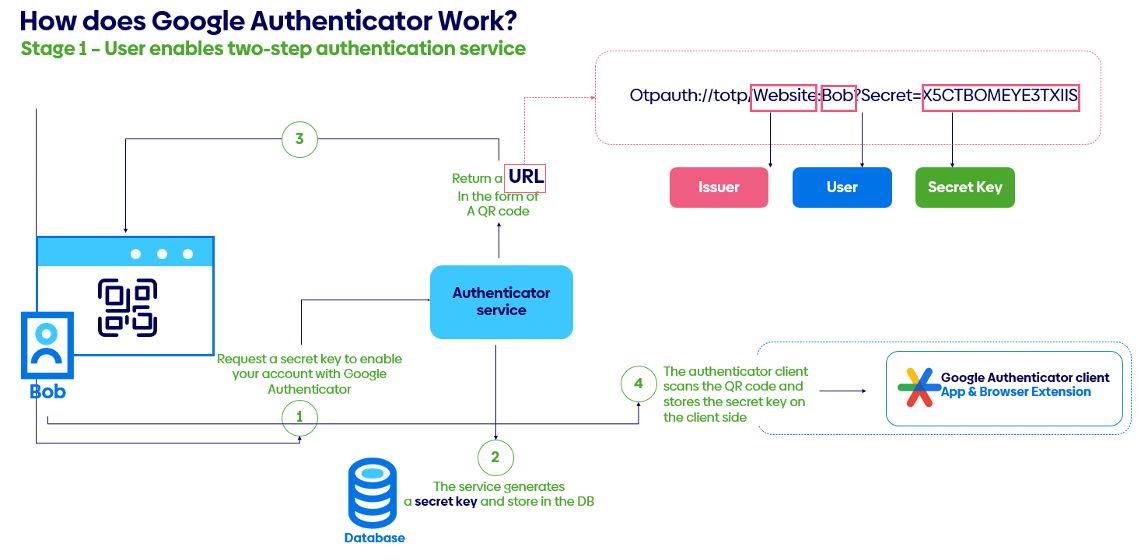
Figure 1 Example flow of standard TOTP-based authentication
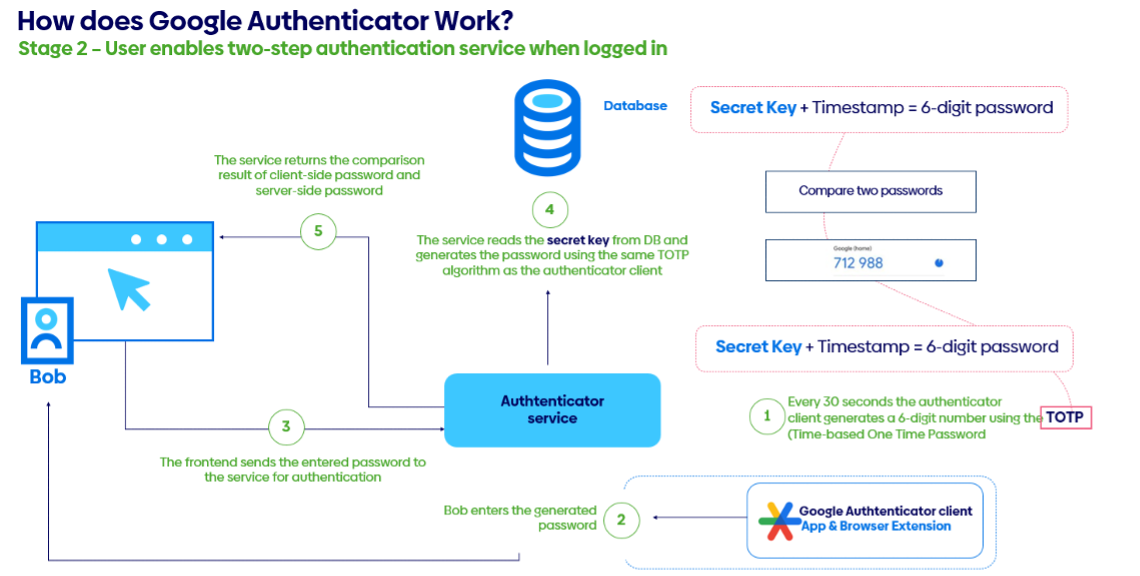
Figure 2 Example flow of standard TOTP-based authentication
The incidents described clearly show how these weaknesses can be leveraged to bypass MFA and undermine trust in a commonly used authentication mechanism. This research analyzes the technical and procedural gaps that enable such attacks, evaluates their prevalence and impact, and proposes mitigations that balance usability with security, focusing on secure provisioning practices, architectural safeguards against duplicate enrollments, and user-centered strategies to prevent QR-code exposure.
The Incident
The past years proved to be a demanding time for cybersecurity teams worldwide, and Atos’ Global CSIRT was no exception. In the first hours of the New Year the team responded to a significant incident involving an advanced threat actor targeting an XYZ organization’s Azure Virtual Desktop (AVD) environment.
On 1 January (year redacted), the AVD environment generated alerts after a third‑party supplier account (SupplierAccount‑1) conducted reconnaissance using utilities such as csvde and ping. The environment was a small, isolated network specifically designed to provide a limited set of third‑party access to XYZ services, so this activity was highly anomalous and triggered a security incident. The compromise ultimately resulted in the exfiltration of approximately 419 internal company documents.
csvde is one of those not-well known, built-in Windows tools that are meant for administrators but ended up on the LOLBins list due to easily being abused. Officially it’s just a command-line utility for importing and exporting Active Directory data using CSV files, which makes bulk user management less painful. The catch is that because it’s signed by Microsoft and already present on many systems, attackers can abuse it to pull directory information or stage data movement without dropping anything obviously malicious. That “living off the land” aspect lets activity blend in with normal admin behavior and slip past basic security controls.
The initial access vector was notable. The isolated environment was protected by a VPN and conditional‑access controls that permitted connections only from specific supplier IPs and from a small set of authorized supplier machines. To reach that environment an attacker would therefore need to compromise one of those authorized machines and either hijack an active session or obtain valid credentials. The threat actor had established persistent access in the supplier’s network over several months, identified users and machines with access to XYZ, and performed lateral movement and credential harvesting.
The adversary used a supplier proxy server – a machine on the whitelist for VPN access – as a jumphost into XYZ’s environment. Forensics by Atos Global CSIRT identified artifacts showing the attacker actively searching for 2FA-related material: screenshots and QR codes saved as images, and authenticator applications installed on workstations. These efforts succeeded: one user had 2FA configured in a desktop authenticator (WinAuth), and another had retained a backup image of their 2FA QR code in their Documents folder.
These findings illustrate a critical point: when both authentication factors exist on the same device, the protection afforded by 2FA is effectively nullified and behaves like single‑factor authentication.
Global campaigns impacting directly stored second-factor authentication
A clear analogue to “The Incident” is the ongoing fallout from the 2022 LastPass breaches. Attackers exfiltrated encrypted vaults and related metadata [1] and – according to multiple follow‑up reports – included MFA seeds/keys among the stolen material. Investigations and court filings later connected parts of a roughly $150M crypto theft to credentials and secrets obtained from those compromised vaults [2], illustrating how static enrollment artifacts (for example, TOTP seeds stored in notes or vault fields) can be weaponized months after exposure. While debate continues over the precise causal chain for each victim, U.S. authorities have seized more than $23M traced to the thefts, and numerous media and industry analyses link the thefts to the LastPass incidents-demonstrating at scale how long‑lived enrollment artifacts can be replayed or cloned once they are exposed.
Malware‑based theft of second‑factor material provides another concrete precedent. Android banking Trojans such as Cerberus and successors gained capabilities to capture Google Authenticator screens, harvest one‑time codes via Accessibility abuse, and in some cases exfiltrate enough data to recreate or intercept 2FA in real time. Security research and vendor advisories have documented campaigns where malicious apps lifted Authenticator codes [3] (and broader device data) to defeat TOTP at the moment of login-showing that possession of either the time‑limited codes or the underlying seed (when present in backups or files) enables effective factor cloning.
A third, widely observed pattern is device‑enrollment fraud: once attackers obtain primary credentials, they register an additional MFA device to the victim’s account and thereby gain ongoing access without having to bypass the original factor on every attempt. MITRE ATT&CK codifies this behavior as T1098.005 [4] (Account Manipulation: Device Registration) and documents real adversaries (for example, APT29 and Scattered Spider) exploiting it in cloud identity environments. Case studies from Duo’s research [5] show adversaries replacing or adding phones to MFA‑protected accounts and then authenticating via alternate methods (such as SMS passcodes). Blue‑team playbooks and detection content (for example, from Splunk) now include alerts for suspicious admin activity and MFA bypass states. Although the technique does not always involve a QR screenshot, the result mirrors “The Incident”: an attacker establishes a parallel second factor without the user’s knowledge.
The mechanics of TOTP provisioning are well documented and routinely demonstrated by security tools, which further underscores the risk posed by stored enrollment images. Pen‑test and application‑security guides show how to decode the otpauth:// URI embedded in a TOTP QR code to recover the base32 seed and then generate valid codes indefinitely; vendor documentation also often recommends storing TOTP seeds/QRs in password managers for convenience. That convenience concentrates risk: a single leaked QR image is equivalent to disclosing the secret key, and that exact condition enabled the “2024 Incident” replay.
Finally, the rise of QR‑code phishing (“quishing”) has made users more accustomed to interacting with opaque QR images that conceal destinations or payloads. Consumer advisories, municipal warnings (for example, New York City parking‑meter stickers), and national guidance highlight how QR codes can be used to direct victims to phishing sites or deliver malware, exploiting user speed and trust. While these scams are not specific to TOTP, they are relevant: they show that QR artifacts are trivial to substitute, capture, and redistribute in the wild-conditions that map directly onto the mishandling and misuse of 2FA enrollment QR codes.
Insecure options of storing 2FA or it’s “backups”
When users fear losing access because the device that generates or stores two-factor authentication (2FA) codes fails, they often adopt ad hoc backup practices that reduce overall security. As discussed above, saving the QR code used to provision 2FA is a common and risky behavior at the organizational level. The problem is aggravated when authenticator applications are installed on the same workstation that also stores account credentials – these can be extracted or intercepted by malware. Storing both passwords and second-factor material in the same password manager creates a single point of failure: compromising that vault yields full account access. Likewise, keeping account recovery codes alongside credentials introduces the same risk. Finally, using email to deliver 2FA codes is fragile because an attacker with access to the mailbox (as seen in recent incidents) can trivially obtain those codes.
So how should you store 2FA backups?
The best practice should be crafted in consideration of threat profile. There is some universal advices, however, high profile person (VIP or high privilege technical architect) should take additional steps as precautions to securing his accesses, as they are more valuable and generate higher risk for organization in case of being stolen or leaked.
Printing your recovery codes is definitely an option. You can use normal paper or take additional steps and use durable media like archival paper. This will all it to survive moisture, fire and time. Put the printed copy in a locked safe or a bank safe-deposit box. You may use tamper-evident envelopes or seals if multiple people may access it. Store a secondary physical copy in a different secure location to reduce single-point failures, and never photograph, email, or otherwise put the code into everyday cloud or messaging services.
Another option, or in addition, you may keep an encrypted digital copy on an offline hard drive: full-disk encryption (or a strongly encrypted file container) protects the codes if the device is lost or stolen. Use well-reviewed tools (BitLocker, VeraCrypt) with a strong passphrase or hardware-backed keys, disconnect the drive when not needed, and treat its decryption key as a separate secret.
It’s important to treat these codes as single-use emergency keys: only access them when absolutely necessary and regenerate the codes immediately after use or any suspected exposure. With a simple physical copy in a safe plus an encrypted offline drive as a controlled digital backup, you balance long-term durability, rapid recovery, and strong protection against both physical theft and remote compromise.
Best practices in detection and prevention from organization perspective
Detecting unauthorized access to 2FA provisioning artifacts, such as screenshots of provisioning QR codes or account recovery keys stored on disk is a challenging task. When an endpoint or account is compromised, distinguishing legitimate user activity from actions by a threat actor becomes difficult or impossible using only local telemetry.
Re-provisioning 2FA to a separate device is likewise hard to detect because most common authenticators are non-interactive, TOTP-based applications. From an administrative perspective there is no observable provisioning event and no reliable way to enumerate how many devices have a given 2FA configuration.
Accordingly, security teams must adopt a different perspective: prioritize detection of improperly stored provisioning material (QR code images, screenshots, and recovery keys). This remains difficult in practice and is generally limited to heuristic signals like file naming conventions, locations, or the recognizable structure of recovery keys, rather than definitive indicators of compromise.
Interactive Multi-Factor Authentication as a solution
Interactive Multi-Factor Authentication systems typically issue device-specific or single-use enrollment tokens (similarly to classic 2FA – provided as QR codes), but this time they are consumed during initial registration. Which means a single QR code can’t be reused to enroll multiple devices. That approach binds the newly created credential to a specific installation and leverages device hardware ID or the platform’s secure enclave to make cloning or straightforward export of the secret difficult. If users need multiple devices, common options are per-device enrollment, issuing hardware security keys for each device.
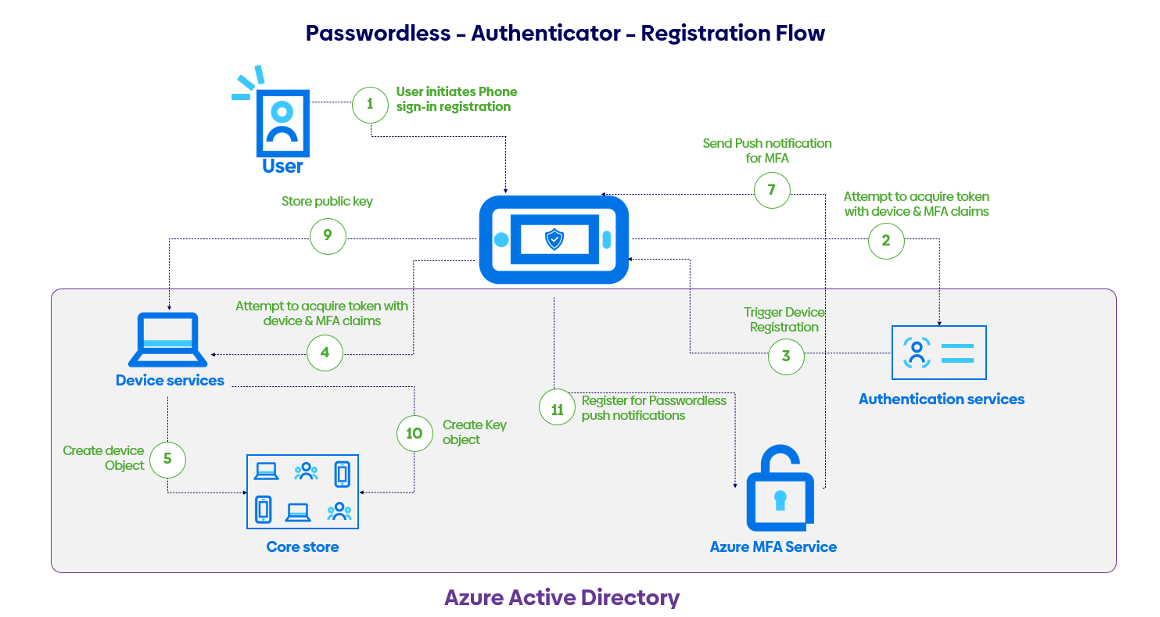
Figure 3 Example interactive authentication flow
Interactive MFA generally provides stronger protection and a smoother user experience than non‑interactive methods such as time‑based one‑time passwords (TOTP) or SMS codes. Push notifications and authenticator apps can show context about the request (which app or location triggered it), support number‑matching to prevent accidental or automated approvals, and feed device state and risk scores into conditional access policies.
The downsides of interactive MFA are push fatigue and social‑engineering that still remain concerns unless mitigated by enforced use of number‑matching, require biometric or PIN confirmation as a part of approval. Prompts can also be limited. Enrollment and recovery flows also need careful design to prevent lockouts.
From the admin perspective, the biggest change is an additional option of logging events related to interactive MFA. These events are logged as actions like sent, delivered, responded with outcomes and often some contextual data (user/device IDs, timestamps, IP/geolocation, authenticator/app, challenge type, and risk/conditional‑access info). These logs enable tracing, incident investigation, policy tuning, SIEM alerting, and compliance.
Takeaways
TOTP-based 2FA is widely used but fragile in practice because the shared secrets delivered by QR codes are often exposed in various ways like screenshots, emails and cloud backups. Multiple authenticators turn the “second factor” into just another credential. Real-world incidents illustrate this clearly: a described January 2024 compromise of an Azure Virtual Desktop environment showed attackers harvesting screenshots, QR images and desktop authenticators from a supplier’s workstation, allowing them to bypass MFA. The LastPass breaches and Android banking malware provide parallel examples where stolen or copied seeds, codes and authenticator data were replayed or abused long after exposure. Attackers also register additional MFA devices to accounts (device‑enrollment fraud), creating persistent access without repeatedly breaking the original factor.
Storing TOTP seeds, recovery codes or authenticators alongside passwords creates a single point of failure. Same for email and cloud backups, that are particularly risky.
At an organizational level, detection is hard because provisioning events are often invisible; defenders should instead reduce exposure through secure provisioning practices, automated secret rotation, controls to block duplicate enrollments, heuristic detection of improperly stored provisioning artifacts, and user-centered education to avoid poor backup habits.
Future is in interactive multi-factor authenticator where provisioning is done once, and seed is generated using hardware ID or methods that bind it to single device or application. Non-interactive 2FA should go away.
References
[1] “LastPass breach timeline: How a monthslong cyberattack unraveled | Cybersecurity Dive,” [Online]. Available: https://www.cybersecuritydive.com/news/lastpass-cyberattack-timeline/643958/.
[2] “US seizes $23 million in crypto linked to LastPass breaches | BleepingComputer,” [Online]. Available: https://www.bleepingcomputer.com/news/security/us-seizes-23-million-in-crypto-stolen-via-password-manager-breach/.
[3] “SonicWall – Android malware steals your Google Authenticator codes,” [Online]. Available: https://www.sonicwall.com/blog/android-malware-steals-google-auth-codes.
[4] “Account Manipulation: Device Registration, Sub-technique T1098.005 – Enterprise | MITRE ATT&CK®,” [Online]. Available: https://attack.mitre.org/techniques/T1098/005/.
[5] “Device bait and switch: A case of device replacement | Duo Security,” [Online]. Available: https://duo.com/blog/device-bait-switch-a-case-of-device-replacement.
Posted on: March 30th, 2026

Piotr Mazurkiewicz
Follow or contact Piotr :

Share this article