Anatomy of access: Windows device objects from a security perspective
Table of contents
- 1 Introduction
- 2 Device objects as the most viable kernel attack vector
- 3 Accessing device objects
- 4 Bonus – device mapper tool
1. Introduction
This article was not initially intended to be published as a standalone piece. It started as an introduction to a different article I am currently working on, but eventually it grew to the point where I decided to make it an article of its own.
It provides extensive, up-to-date practical knowledge about accessing device objects – the most common way Windows kernel-mode drivers are interacted with from userland. It explains caveats such as the minimum access rights required to interact with a driver, direct device object access, the nuances of accessing devices in device stacks, and additional risks for drivers with multiple device objects — all exemplified with practical exercises.
The article also challenges several common misconceptions and false assumptions, which sometimes lead to vulnerabilities.
The focus is on the interaction vector as part of the attack surface, not on any specific bug class. A good understanding of these caveats is crucial for accurately evaluating the attack surface and — by extension — the exploitability of individual cases.
This material is aimed at kernel-mode driver developers, security researchers, reverse engineers, and everyone else interested in the subject. A solid grasp of the Windows security model and basic familiarity with WinDbg are big pluses.
2. Device objects as the most viable kernel attack vector
Most attacks on Windows kernel mode drivers involve using one specific interaction vector from userland to kernel mode – invoking DeviceIoControl() via device handles obtained by calling CreateFile(), just like in the example below:
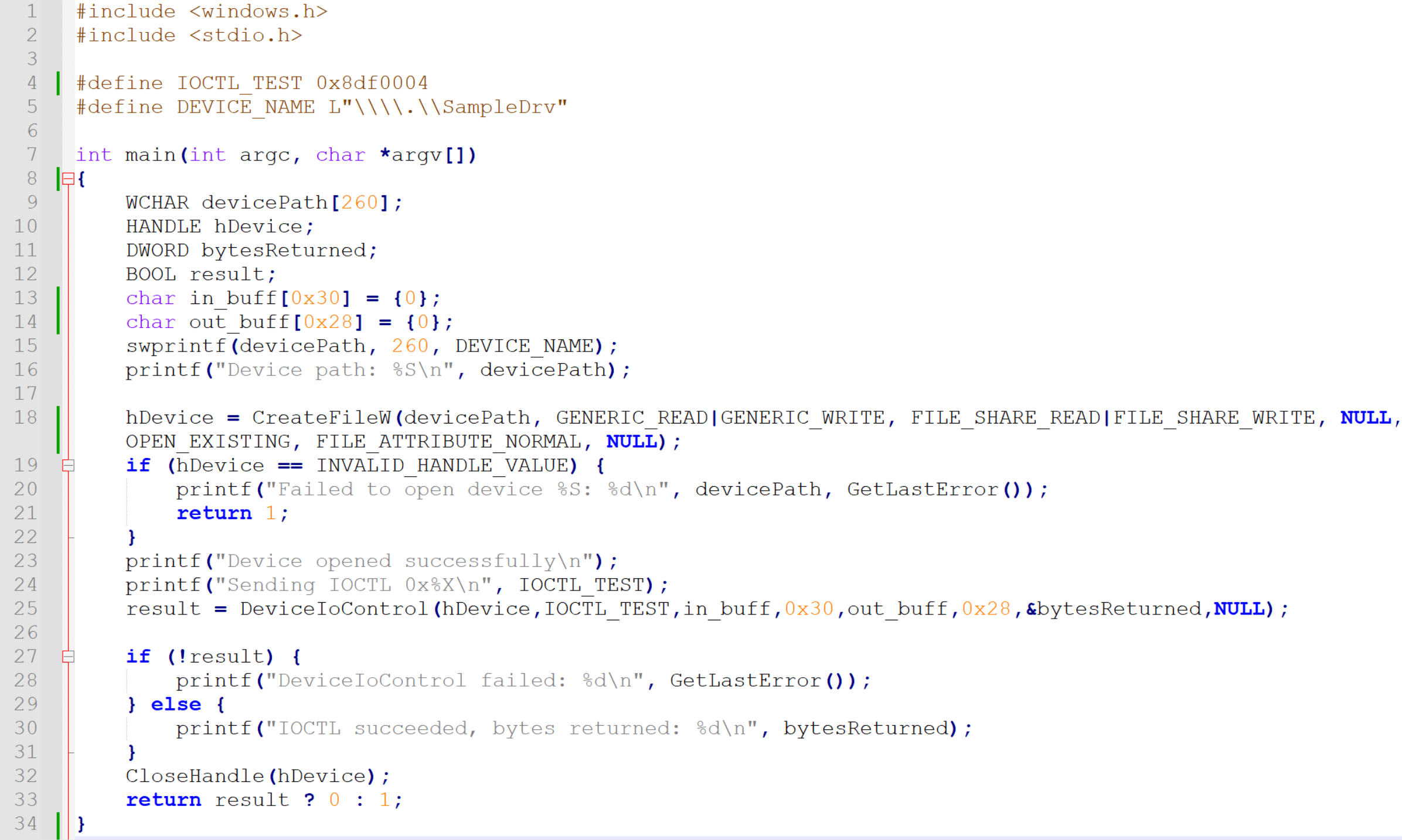
dev_open_basic.c
DeviceIoControl() accepts two optional buffer pointers – lpInBuffer and lpOutBuffer. User-controlled input arrives to the driver through the input buffer, and the driver fills the output buffer in response. The system component responsible for handling this communication is the I/O manager, and the data structure used in this mechanism is IRP.
While Windows drivers can be attacked from userland over a whole list of other interaction vectors (such as event-based callbacks or filter communication ports, just to name a few), sending IRPs is the most common attack vector for two reasons:
- It is the most frequently implemented userland -> kernel mode interaction vector in Windows drivers.
- It offers the most vulnerability-potent userland data input (unstructured, variable-sized data buffer passed via IRP->SystemBuffer, interpreted by driver logic on individual basis).
A very important property of IRP is the MajorFunction code. When a handle is opened, the first IRP, with MajorFunction code = IRP_MJ_CREATE is sent to the driver behind the device.
If that succeeds, the handle is valid and can be passed as an argument to DeviceIoControl(), whose invocation leads to another IRP being sent, this time with MajorFunction = IRP_MJ_DEVICE_CONTROL.
When the handle is closed, an IRP with MajorFunction code = IRP_MJ_CLOSE is sent to the driver. If a read or write operation was attempted on the handle, the driver would receive IRP with IRP_MJ_READ or IRP_MJ_WRITE, respectively.
If a driver supports a specific operation, it implements a dedicated function called IRP dispatch routine and registers it for the corresponding MajorFunction code.
Only a subset of MajorFunction codes can be requested in IRPs sent from userland. For the rest of this article we will solely focus on IRP_MJ_DEVICE_CONTROL whenever referring to IRP, unless specified otherwise.
On the kernel side, the relevant driver receives the input buffer as IRP->SystemBuffer for processing in its IRP_MJ_DEVICE_CONTROL dispatch routine.
A good, accessible example demonstrating implementation of IRP_MJ_DEVICE_CONTROL dispatch routine is HackSysExtremeVulnerableDriver.c, as both the DriverEntry and the function implementing the handler can be found in the same file.
While holistic exploration of the entire Windows kernel mode driver attack surface is a fascinating subject on its own, the rest of this article will be solely focused on IRP (with IRP_MJ_DEVICE_CONTROL via DeviceIoControl() as the target dispatch routine) as the userland -> kernel mode interaction/attack vector.
3. Accessing device objects
While the way device objects are accessed prior to calling DeviceIoControl() seems very straightforward, there are several caveats to it. Let’s explore them.
3.1 Standard pattern
In the first piece of sample code provided in this article, a device object handle is obtained on line 18 by calling CreateFile() like this:
hDevice = CreateFileW(devicePath, GENERIC_READ|GENERIC_WRITE,
FILE_SHARE_READ|FILE_SHARE_WRITE, NULL, OPEN_EXISTING, FILE_ATTRIBUTE_NORMAL, NULL);`
Let’s take a closer look at the first two parameters (lpFileName and dwDesiredAccess) in the context of opening device object handles.
3.2 Accessing device objects via symlinks versus directly
In the provided example, CreateFileW() receives the wide-character string \\.\SampleDrv as the lpFileName parameter. A parameter that usually takes DOS-style paths such as “C:” in this case starts with a backslash, just like UNC paths.
The \. prefix
The \\.\ prefix is a special indicator that causes Windows to access the Win32 device namespace directly. This routes the request to the object manager namespace (OMNS) (paths in this namespace also often referred to as “NT paths”).
The "\\.\" prefix will access the Win32 device namespace instead of the Win32 file namespace. This is how access to physical disks and volumes is accomplished directly, without going through the file system, if the API supports this type of access. You can access many devices other than disks this way (using the CreateFile and DefineDosDevice functions, for example).
As we can further read in the DOS device paths section here, the \\.\ prefix is also referred to as DOS device specifier, along with \\?\. Both \\.\ and \\?\ paths map to \??\ in the OMNS namespace.
Conversion from \\.\ to \??\ is done by ntdll before the path reaches the object manager.
When the object manager resolves a path through \??, it does a two-step lookup:
- First checks the per-session local DosDevices directory for the caller’s logon session: \Sessions\0\DosDevices\<LogonSession-LUID>.
- If not found there, falls through to \GLOBAL?? (directory object containing the system-wide DOS device symlinks).
The GLOBAL?? directory
The best way to browse the entire Windows object manager namespace is to either use a GUI tool such as WinObj, WinObjEx64 or the NtObjectManager Powershell module.
In the screenshot below we can see the OMNS structure and some of the contents of the \GLOBAL??\ directory:
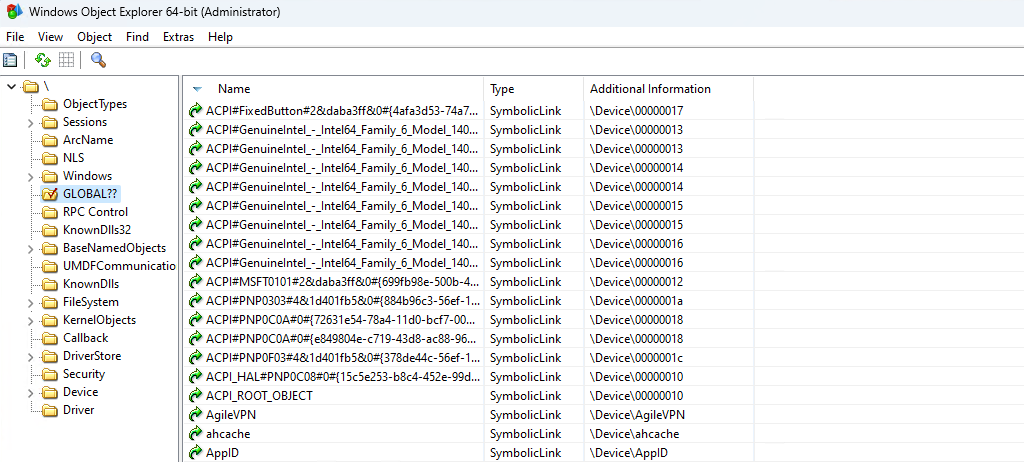
GLOBAL?? directory view in WinObjEx64
So, \GLOBAL?? is where paths starting with \?? are routed. \?? serves as a dispatch mechanism that sits in front of it to enable per-session overrides (e.g., subst drive mappings are local to a logon session and live in the per-session directory, while everything else lives in \GLOBAL??).
When we invoke CreateFile(), the path resolution goes as follows:
CreateFile("\\\\.\\SampleDrv", ...)
    → ntdll converts to \??\SampleDrv
        → ObjMgr resolves \?? (per-session, then \GLOBAL??)
            → finds SampleDrv symlink in \GLOBAL??\SampleDrv
                → points to \Device\SampleDrv
\Device is the OMNS directory where named device objects reside.
It is also worth keeping in mind that drivers often use \DosDevices\ (the global DosDevices variant) when creating symlinks to their device objects.
As we can see in the screenshot below, \DosDevices is simply a symlink to \??, so it also resolves to \GLOBAL??:
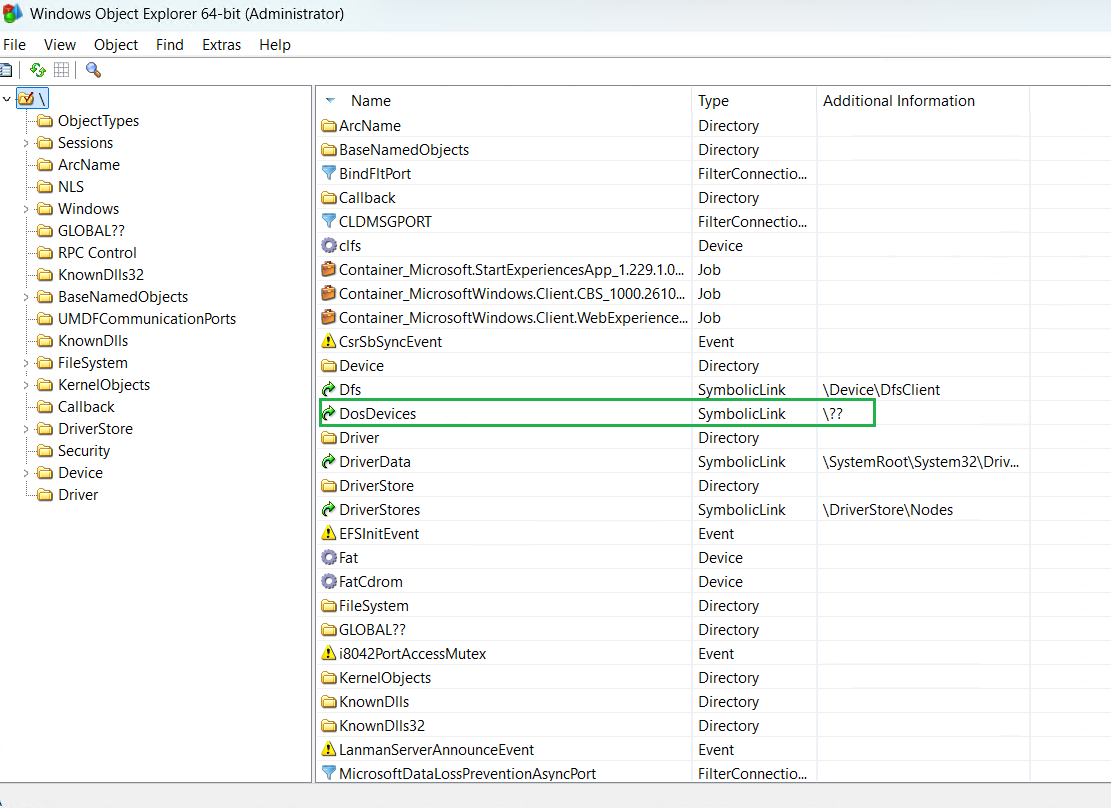
DosDevices in root directory in WinObjEx64
So, whenever we pass \\.\ to CreateFile(), we are using a symlink in \GLOBAL??.
Symlinks in GLOBAL??
Symlink creation takes place during driver initialization (usually somewhere in the call tree starting in DriverEntry).
After creating the device object in the \Device directory, the driver can link it under an arbitrary name by either directly calling IoCreateSymbolicLink or via IoRegisterDeviceInterface.
It is quite common to see the device object have the same name as the symlink in \GLOBAL??\ pointing to it, but it can as well be something completely different. It is also possible for a driver to create its device object outside of the Device directory (for instance, I have seen drivers creating their device object directly in the \GLOBAL??\ path, skipping the symlink entirely).
Device symlink creation in \GLOBAL?? is optional, which means that not all device objects created by drivers are linked there. The purpose of linking device objects under \GLOBAL?? is to make them accessible with the device namespace prefix \\.\, so it happens if the device object is intended to be accessible from userland. A lot of device objects sitting in \Device are not linked in \GLOBAL??.
However, not having a symlink in \GLOBAL?? is not a security boundary, although it does prevent the device object from being accessed with CreateFile().
It is possible to open handles to device objects directly from the \Device directory, regardless to any symlinks.
As per https://learn.microsoft.com/en-us/windows/win32/fileio/naming-a-file: However, a handle could be opened to that device using any APIs that support the NT namespace absolute path of the format “\Device\Xxx”.
Thus, we can bypass CreateFile() entirely and call NtCreateFile() directly to open the device object via its NT path, yielding a handle usable with DeviceIoControl() exactly as with a symbolic-link-based handle — see the example C file: dev_open_direct.c
This should be kept in mind while evaluating the attack surface, especially from the runtime perspective. By doing so, we are quite likely to discover drivers that — contrary to the developer’s intentions — allow user-mode code to send IRPs to them and trusting them as if they came from another driver (e.g. not checking IRP’s RequestorMode prior to further processing).
3.3 Desired access zero
This section explains why SYNCHRONIZE is the actual minimum access right one needs to have in the device object security descriptor in order to send IOCTLs via DeviceIoControl().
IOCTL codes are 32-bit integers (DWORDs) passed as the second argument to DeviceIoControl(). In simple, practical terms their role is to identify a specific functionality within an IRP dispatch routine. So usually one dispatch routine supports multiple IOCTLs, with corresponding code blocks sitting behind conditions, just like in HackSysExtremeVulnerableDriver.c:
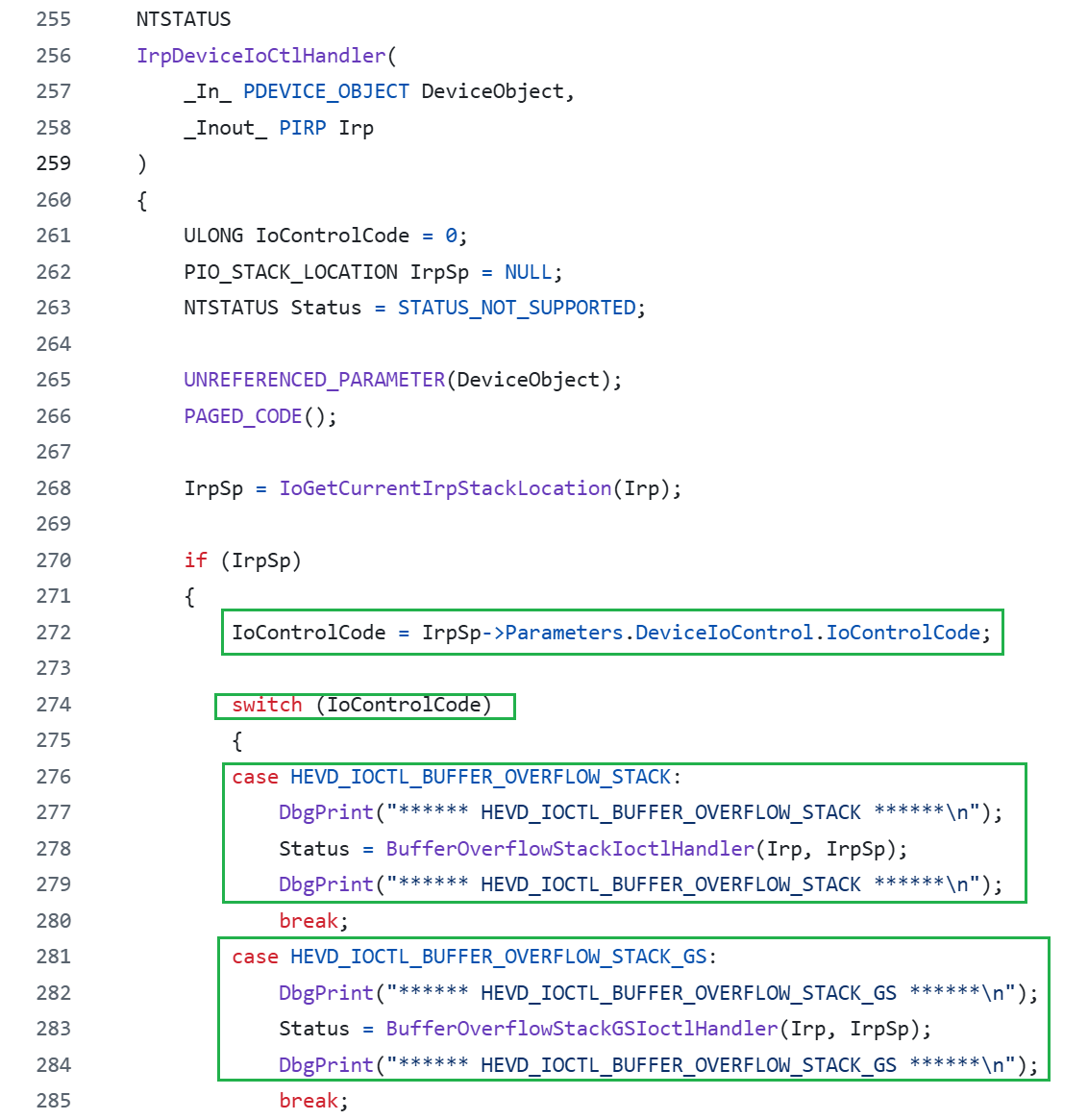
In HEVD source code, the IOCTL codes used by the driver are defined in HackSysExtremeVulnerableDriver.h. HEVD generates them by calling its own macro named IOCTL, which is defined in the same header file and is simply a wrapper over the CTL_CODE macro defined in devioctl.h, part of WDK.
#define IOCTL(Function) CTL_CODE(FILE_DEVICE_UNKNOWN, Function, METHOD_NEITHER, FILE_ANY_ACCESS)The detailed structure of IOCTL and the CTL_CODE macro description can be found on this page.
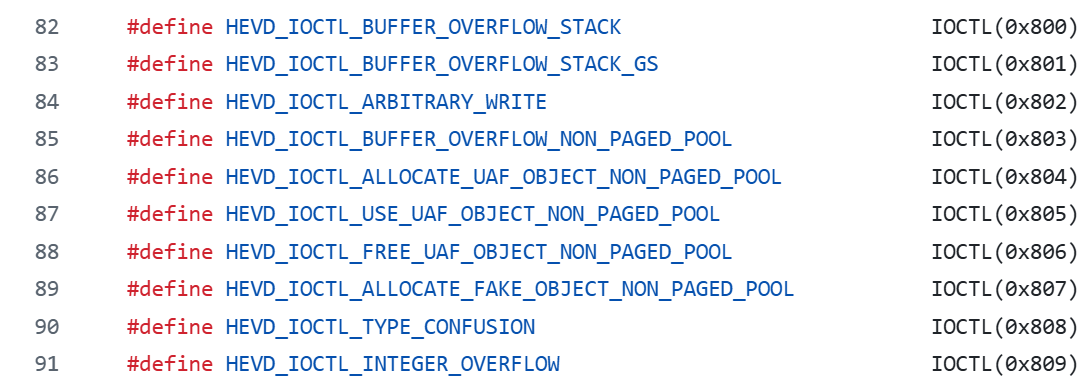
IOCTL code constant definitions in HackSysExtremeVulnerableDriver.h
While the values of IOCTLs used in a driver are picked by the developer, they are not entirely random/arbitrary.
Each IOCTL carries four distinct pieces of information: Device Type, Method, Access and Function.
To inspect these values for an IOCTL we can use the !ioctldecode command in WinDBG (also available in user-mode debugging session):

!ioctldecode
I only want to focus on one of these properties; Access. It can be one of the following four values: FILE_ANY_ACCESS, FILE_READ_ACCESS, FILE_WRITE_ACCESS, FILE_READ_WRITE_ACCESS.
The important part to understand is that the Access property has no impact on whether a user can open a device handle, but rather whether sending a particular IOCTL over a previously opened handle will be allowed or denied. Which makes sense, as IOCTL is only passed to DeviceIoControl() (which is called when the handle is already open and valid), not to CreateFile().
Whether a user can open a handle for a device object is determined by the target device object security descriptor.
Once a handle is obtained, DeviceIoControl() can be invoked, passing the parameters – including IOCTL – to the I/O Manager. The I/O Manager decodes the IOCTL, extracts the embedded Access property, and evaluates it against the permissions granted on the handle. In practice this means that, for example, if we are trying to send an IOCTL with with Access = FILE_READ_WRITE_ACCESS using a handle obtained with CreateFile(path,GENERIC_READ,…), DeviceIoControl() will fail with error code 5 (ACCESS_DENIED), and our IRP will never make it to the DeviceIoControl() dispatch routine.
There are many ways we can view a device object’s security descriptor. We can either use a GUI tool such as WinObj or WinObjEx64, we can use WinDBG, or – my personal favorite – NtObjectManager. NtObjectManager is super useful for experiments and anything requiring programmatic access: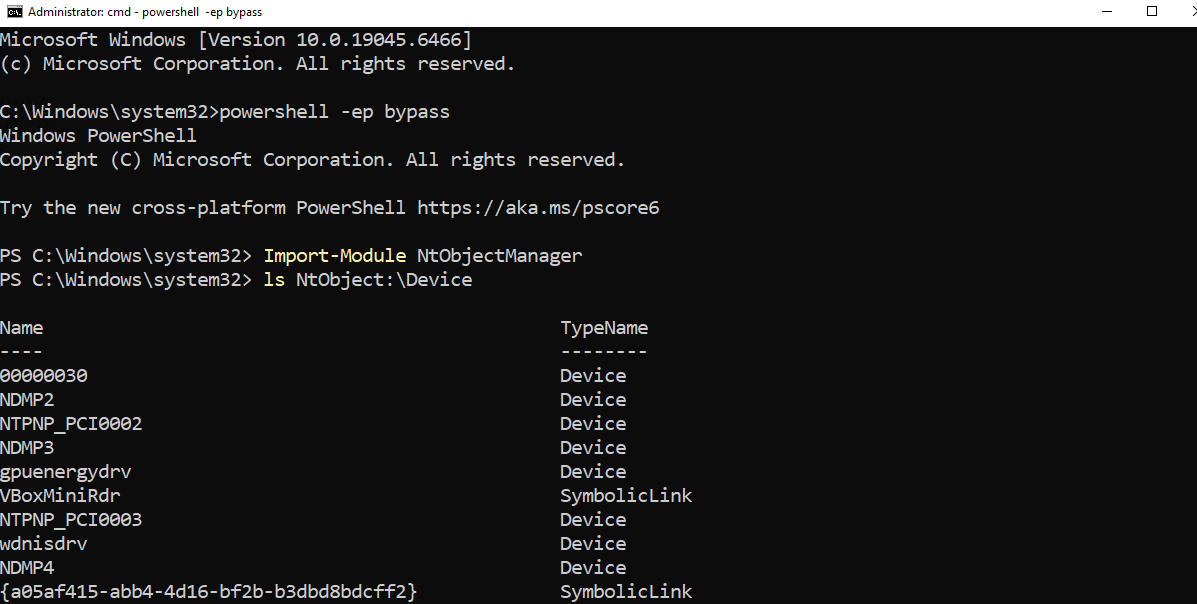
Browsing Device objects with NtObjectManager
Obtaining a security descriptor is as easy as calling Get-NtSecurityDescriptor. We can also easily display it as SDDL:

Displaying device object security descriptor in NtObjectManager
The device we use as example – is linked in \GLOBAL?? as PhysicalDrive0:
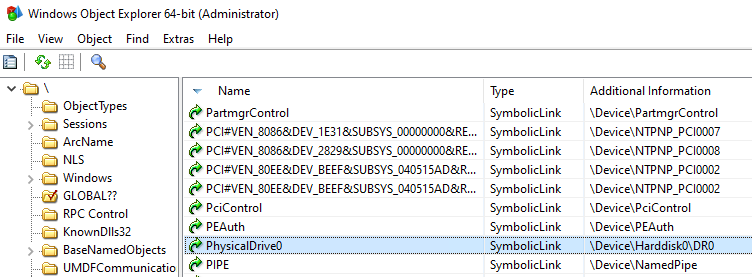
PhysicalDrive0
While examining SDDLs it is worth keeping in mind that the subset of applicable access rights strings (such as GA for GENERIC_ALL) depends on the target object type. Device objects use the same SDDL access rights subset as file objects (SDDL for device objects).

The security descriptor for \Device\Harddisk0\DR0 has five Access Control Entries (ACEs), all of Allow type: (A;;FA;;;BA)(A;;FA;;;SY)(A;;FX;;;WD)(A;;FX;;;RC)(A;;0x12019f;;;UD).

(A;;FA;;;SY) and (A;;FA;;;BA) grant Full Access (FA) to NT AUTHORITY/SYSTEM (SY) and Builtin Administrators (BA), respectively (which is self-explanatory and expected). There is also an ACE for UD (User Mode drivers), and a couple of additional ACEs granting access specified as FX to groups aliased as WD (World) and RC (Restricted Code). As explained in https://learn.microsoft.com/en-us/windows-hardware/drivers/kernel/sddl-for-device-objects: Any ACL that specifies RC must also specify WD. When RC is paired with WD in an ACL, a superset of Everyone including untrusted code is described.
FX is an alias for FILE_GENERIC_EXECUTE, as we can find here, whose meaning is obvious in the context of user mode executable files, but does not directly map to a device object (as a device object cannot be “executed”).
By examining winnt.h we can see that FILE_GENERIC_EXECUTE is one collective access rights alias combining STANDARD_RIGHTS_EXECUTE, FILE_READ_ATTRIBUTES, FILE_EXECUTE and SYNCHRONIZE:

Note there is no GENERIC_READ in this permission set.
So it comes as no surprise that the following CreateFile call, requesting GENERIC_READ, fails with error code 5 (access denied), when invoked from a regular user token:
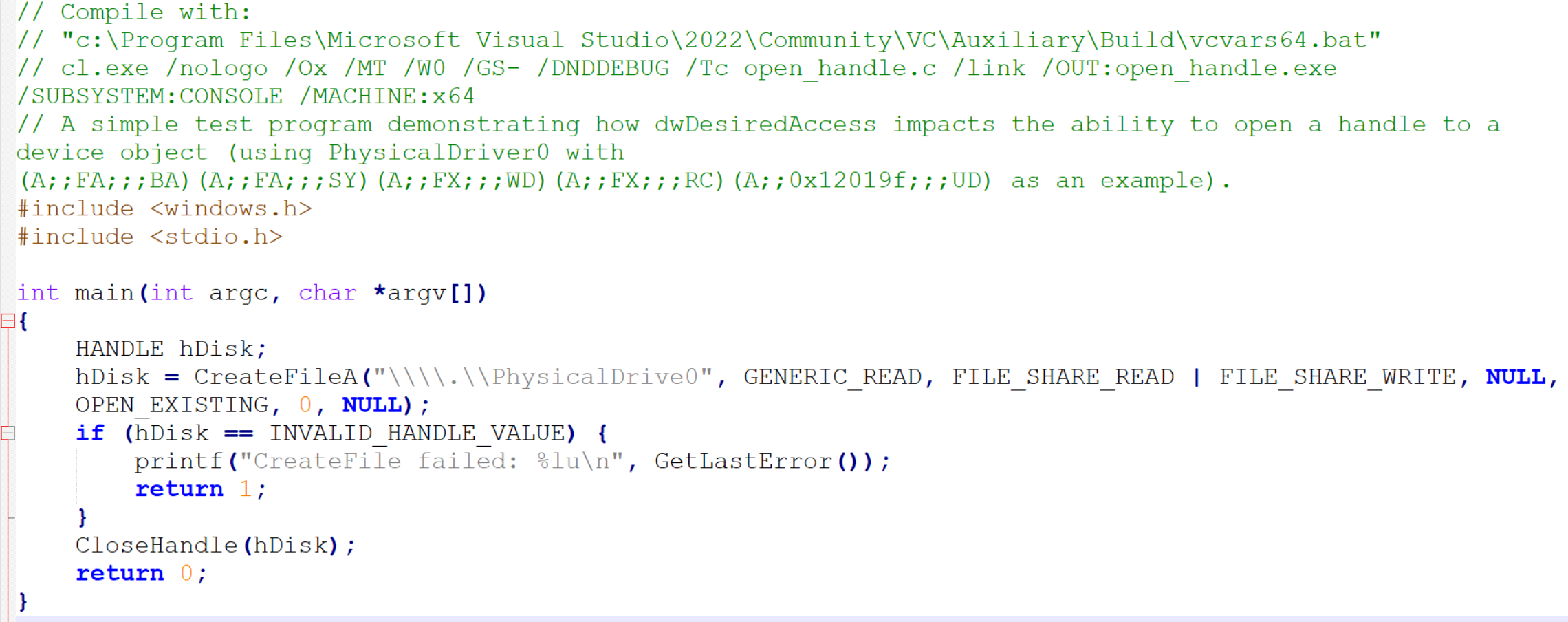
Sample program requesting GENERIC_READ handle on PhysicalDrive0
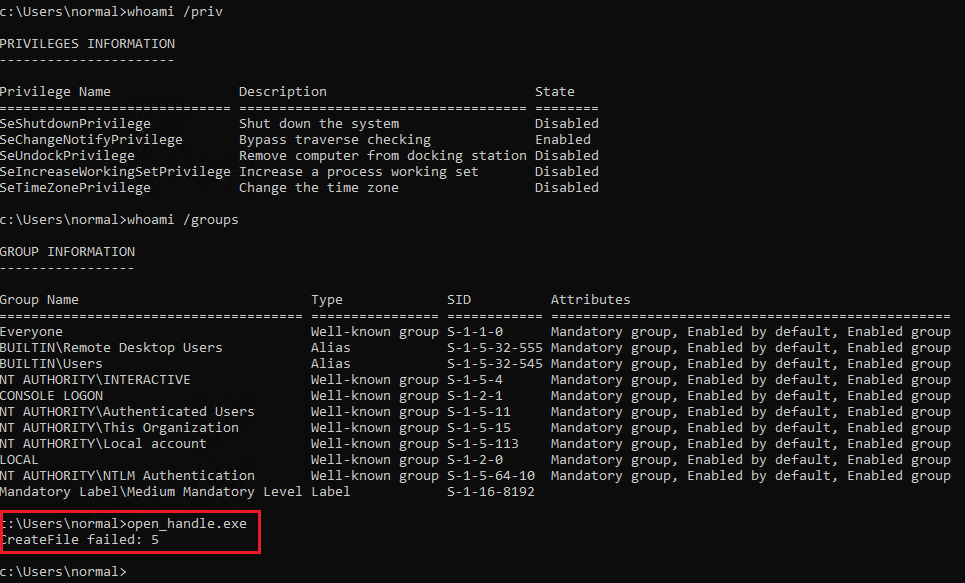 GENERIC_READ access denied for PhysicalDrive0
Now, let’s change dwDesiredAccess to something else, for instance to 0:
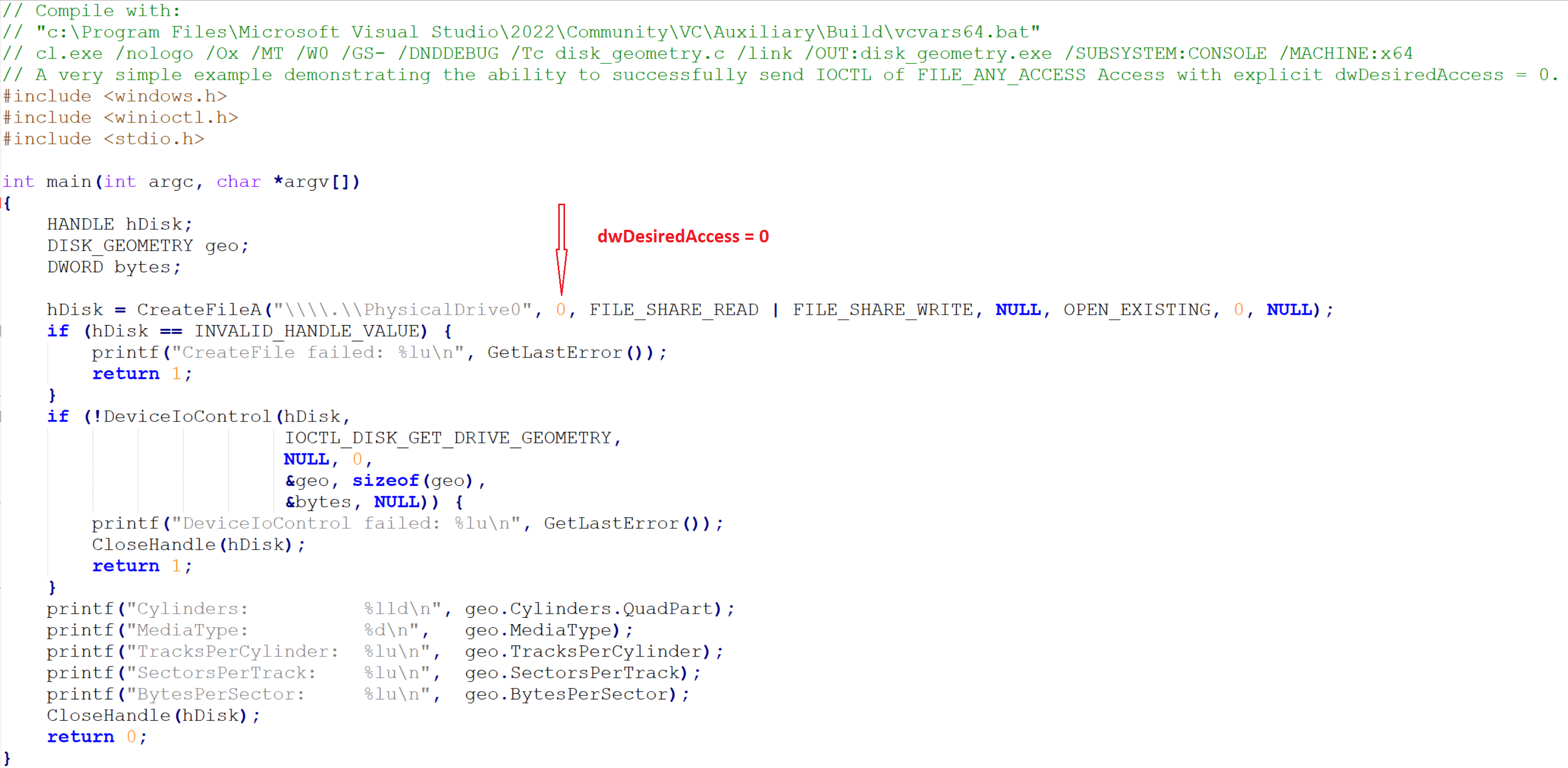
Opening a handle to PhysicalDrive0 with dwDesiredAccess=0
The example has also been extended with actual use of DeviceIoControl() to send a real IOCTL supported by disk.sys (which is the driver whose device object we are opening):
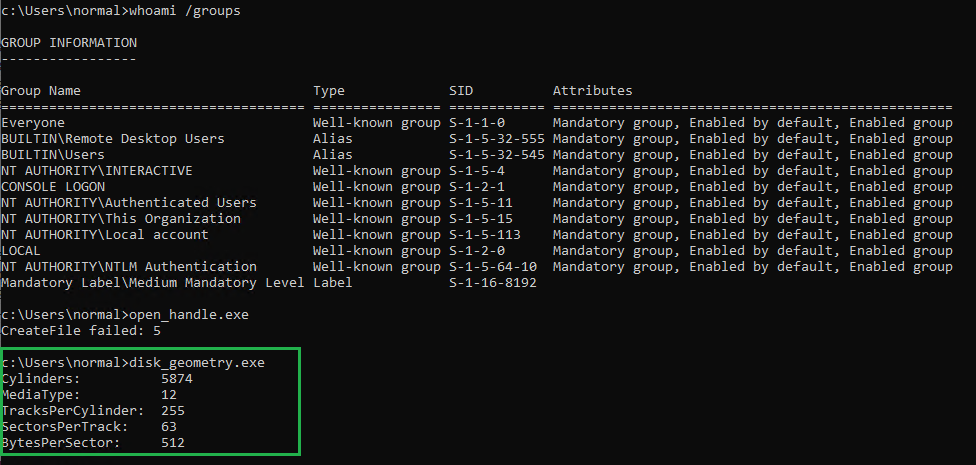
dwDesiredAccess = 0 granted
IOCTL_DISK_GET_DRIVE_GEOMETRY is defined in winioctl.h and even without inspecting its actual DWORD value and then decoding it, we can see it has FILE_ANY_ACCES by looking into its definition in the header file:

winioctl.h
This example clearly demonstrates that FILE_ANY_ACCESS means that we do not need GENERIC_READ or GENERIC_WRITE permission at all.
What is counterintuitive in this case is that we would expect dwDesiredAccess = 0 to literally mean zero access, while we must have some to be able to successfully open a handle.
What actually happens under the hood is that: 1. In kernelbase.dll CreateFileW() calls CreateFileInternal(), passing the requested dwDesiredAccess as the second argument. 2. Then CreateFileInternal() performs logical OR on it, with mask 0x100080 (DesiredAccess |= SYNCHRONIZE | FILE_READ_ATTRIBUTES). 3. The value is then passed (also as the second argument) to NtCreateFile().
We can confirm that 0x100080 is in fact SYNCHRONIZE | FILE_READ_ATTRIBUTES by once again examining winnt.h:
...
#define SYNCHRONIZE                 (0x00100000L)
...
#define FILE_READ_ATTRIBUTES        (0x0080)    // all
This can also be confirmed empirically by modifying the dev_open_direct.c example (which uses native NtCreateFile() to directly open device objects, bypassing the symlinks whether they exist or not). In that example the SYNCHRONIZE right is explicitly passed to NtCreateFile() as the second argument:
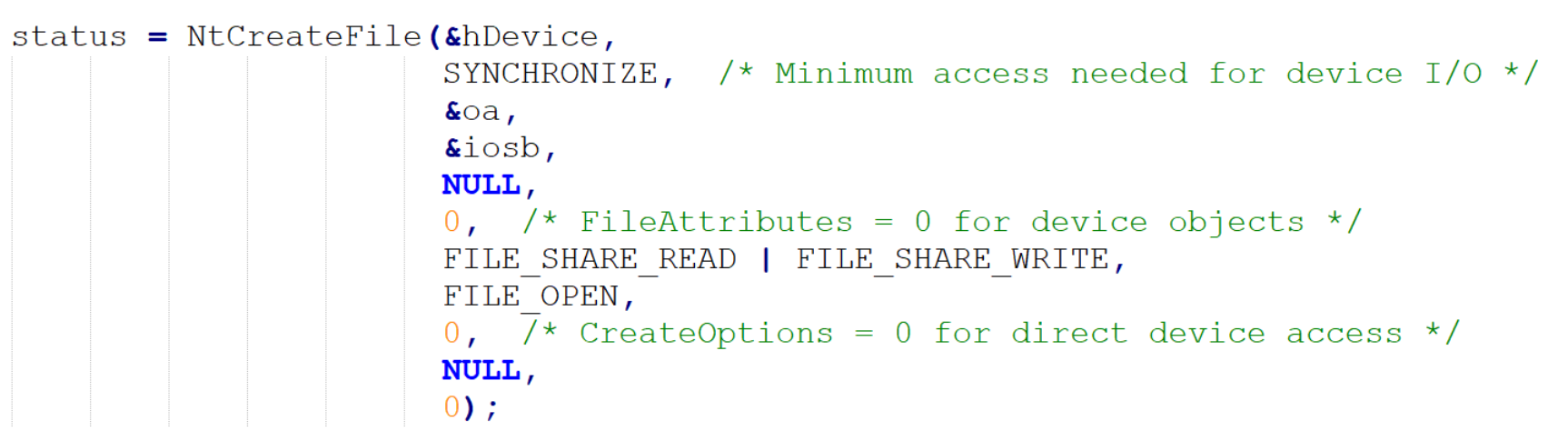
Explicit SYNCHRONIZE use in dev_open_direct.c
3.4 Named vs unnamed devices
If a device object does not have a name, it is not visible in the OMNS namespace. And for that reason it is also not possible to open a handle to it directly.
There are also some caveats regarding unnamed device objects when it comes to their security descriptors. If we read the MSDN entry for IoCreateDevice, we encounter the following sentence:
If a device name is not supplied (that is, DeviceName is NULL), the device object created by IoCreateDevice will not (and cannot) have a discretionary access control list (DACL) associated with it.
This statement suggests that unnamed device objects cannot have security descriptors and are effectively not securable objects, but in practice this is not the case. We will take a closer look at unnamed device object security descriptors in a bit.
3.5 Control devices vs PnP devices
If we want to better comprehend the attack surface created by device objects, we need to understand the distinction between:
- Non-PnP device objects – Control Device Objects (CDO).
- Device objects supporting Plug and Play (PnP) or power management operations – Functional Device Objects (FDO), Physical Device Objects (PDO) and Filter Device Objects (FiDO).
From the security perspective, the most important difference between these two groups is that:
- CDOs are always named, standalone device objects intended for direct userland interaction. IRP goes to one driver.
- PnP device objects are organized in PnP device stacks, in which (usually) only one device – PDO – is a named device. IRP travels through the entire device stack.
3.6 Device stacks
As the MSDN device nodes and stacks page reads: The sequence of device objects along with their associated drivers is called a device stack. Each device node has its own device stack..
Understanding device stacks is crucial while evaluating kernel mode driver attack surface.
Let’s presume we have the following device stack, from top to bottom:
- UPFLT.sys (upper filter DO, unnamed)
2. A.sys (FDO, unnamed)
3. B.sys (FiDO, unnamed)
4. C.sys (PDO, named, \Device\Sample_C)
In a device stack, an IRP sent via device object handle travels through the entire device stack, from top to bottom.
If a user successfully opens a handle to \Device\Sample_C, first an IRP with MajorFunction code = IRP_MJ_CREATE traverses the stack from top to bottom, invoking individual IRP_MJ_CREATE dispatch routines in each driver:
UPFLT->MajorFunction[IRP_MJ_CREATE]()
A->MajorFunction[IRP_MJ_CREATE]()
B->MajorFunction[IRP_MJ_CREATE]()
C->MajorFunction[IRP_MJ_CREATE]()
The IRP doesn’t cascade down automatically. Each driver must explicitly call IoCallDriver(lowerDeviceObject, Irp) to pass it down. If any driver in the stack fails or blocks the IRP_MJ_CREATE IRP, we do not get a handle at all.
If the handle gets opened successfully and we call DeviceIoControl() on it, again a chain of IRP_MJ_DEVICE_CONTROL dispatch routines will be invoked:
UPFLT->MajorFunction[IRP_MJ_DEVICE_CONTROL]()
A->MajorFunction[IRP_MJ_DEVICE_CONTROL]()
B->MajorFunction[IRP_MJ_DEVICE_CONTROL]()
C->MajorFunction[IRP_MJ_DEVICE_CONTROL]()
This effectively means that device objects become a part of the IRP attack surface once they are attached to a PnP device stack. This is also how filter drivers operate, sitting between other device objects and processing IRPs in between.
3.6.2 Inspecting device stacks
The best way to inspect device stacks is through WinDBG (live kernel debugger session required), using !drvobj and !devnode commands.
Let’s inspect disk.sys, which we already sent an IOCTL to in disk_geometry.c as an example of requesting dwDesiredAccess = 0.
We start with this command: !drvobj \Driver\disk 7.
The number in the second argument (7) specifies how much details we want !drvobj to print. Keep in mind this command is very resource-expensive, which means it is completely normal to have to wait for output for 30 seconds or more. For brevity, I am going to show and comment only the relevant fragments of its output. This is the first important part:
...
Device Object list:
ffffc508e354c060
...
In this particular case the driver has only one device object, whose address we can see after Device Object list:. Whenever this output is followed by an empty line instead of at least one address, it means the driver has no device objects. This is extremely common, especially when we deploy the driver on a system without the corresponding physical hardware.
After device object list there are addresses of key driver functions such as DriverEntry, DriverStartIo, DriverUnload, AddDevice and all the dispatch routines.
Then we get something like this:
Device Object stacks:

!devstack ffffc508e354c060 :

Device Object stacks:

!devstack ffffc508e354c060 :
  !DevObj           !DrvObj            !DevExt           ObjectName
  ffffc508e3540910  \Driver\partmgr    ffffc508e3540a60
> ffffc508e354c060  \Driver\disk       ffffc508e354c1b0  DR0
  ffffc508e345b050  \Driver\storvsc    ffffc508e345b1a0  0000002b
Note that this entire block of text is still a quote from the output from the same, single command. I am emphasizing this because the presence of !devstack, !DevObj, !DrvObj and !DevExt as labels may confuse some readers (it does confuse me everytime I see it). The verbosity level 7 made !drvobj automatically run !devstack on each device object (in this case just one, ffffc508e354c060).
Its output shows us that the only device object owned by disk.sys is named DR0, and that it is sitting between an unnamed object owned by the partmgr driver (above) and another named device object 0000002b (auto-generated name, typical for PDOs) owned by the storvsc driver.
Also note that in this device stack we have two named device objects. We will get back to it in a bit.
3.6.3 Attacking drivers via device stacks
An astute reader will notice that in the earlier disk_geometry.c example we already have interacted with a PnP device object existing in a device stack. We sent an IRP with a custom IOCTL (defined as IOCTL_DISK_GET_DRIVE_GEOMETRY) supported by disk.sys over a handle opened by calling CreateFile() on \\.\PhysicalDrive0, a symlink to \Device\Harddisk0\DR0. And we reached the disk geometry functionality.
Now, let’s assume we have a disk filter driver named VulnDisk.sys attached to the same device stack as an UpperFilter for the Disk Drives device class, appended to HKLM:{4d36e967-e325-11ce-bfc1-08002be10318}.
The device stack now looks like this:
!devstack ffffa6039f10c060 :
!devstack ffffa6039f10c060 :
  !DevObj           !DrvObj            !DevExt           ObjectName
  ffffa6039f1ad030  \Driver\VulnDisk   ffffa6039f1ad180
  ffffa6039f102910  \Driver\partmgr    ffffa6039f102a60
> ffffa6039f10c060  \Driver\disk       ffffa6039f10c1b0  DR0
  ffffa6039f02a050  \Driver\storvsc    ffffa6039f02a1a0  0000002b
So we have a new (unnamed) device object on top of the disk device stack.
Now, somewhere in the IRP_MJ_DEVICE_CONTROL dispatch routine, VulnDisk.sys has a vulnerability in a code block activated only if a specific IOCTL is sent to it:
if (iVar1 == 0x111018) { // iVar1 holds the current IOCTL code from the IRP
    ...
    local_68 = CriticallyVulnerableFunction(
        lVar4,
        *(uint **)(param_2 + 0x18) // param_2 + 0x18 is the IRP->SystemBuffer
    );
}
...
The proof of concept exploiting this vulnerability, making the driver receive our IRP and pass our input buffer into CriticallyVulnerableFunction(), starts exactly the same way as our previous disk_geometry.c example:
hDisk = CreateFileA(
    "\\\\.\\PhysicalDrive0",
    0,
    FILE_SHARE_READ | FILE_SHARE_WRITE,
    NULL,
    OPEN_EXISTING,
    0,
    NULL
);
That’s right, there is no difference in the way the handle is procured, because the handle we open on the named device object gives us access to the entire device stack.
The difference starts with the value of the IOCTL parameter passed to DeviceIoControl(), and of course the size and the contents of the input buffer are completely different.
This pattern applies to a couple of critical vulnerabilities I have discovered and rensponsibly reported (the disk filter driver issue is still being addressed at the time of writing this).
The second one is CVE-2025-13348. With that driver being a storage volume filter, the only difference in the way CreateFile() had to be called was replacing \\.\PhysicalDrive0 with \\.\C:.
If anyone is interested in a deeper dive into attacking filter drivers, I recommend this article.
3.6.4 Security descriptors of unnamed device objects
Despite what IoCreateDevice documentation suggests, unnamed devices can and do have security descriptors. The function just does not allow to specify them explicitly if we provide an empty DeviceName.
Let’s conduct a simple exercise to verify this by creating an extremely simple driver (no IRP processing, no dispatch routines). The source code can be found here.
Its only role is to create a new unnamed device object directly from its DriverEntry function. Once DriverEntry returns, the driver stays loaded, and the device object it has created can be manually inspected from the debugger, so we can check ourselves if it has a security descriptor:
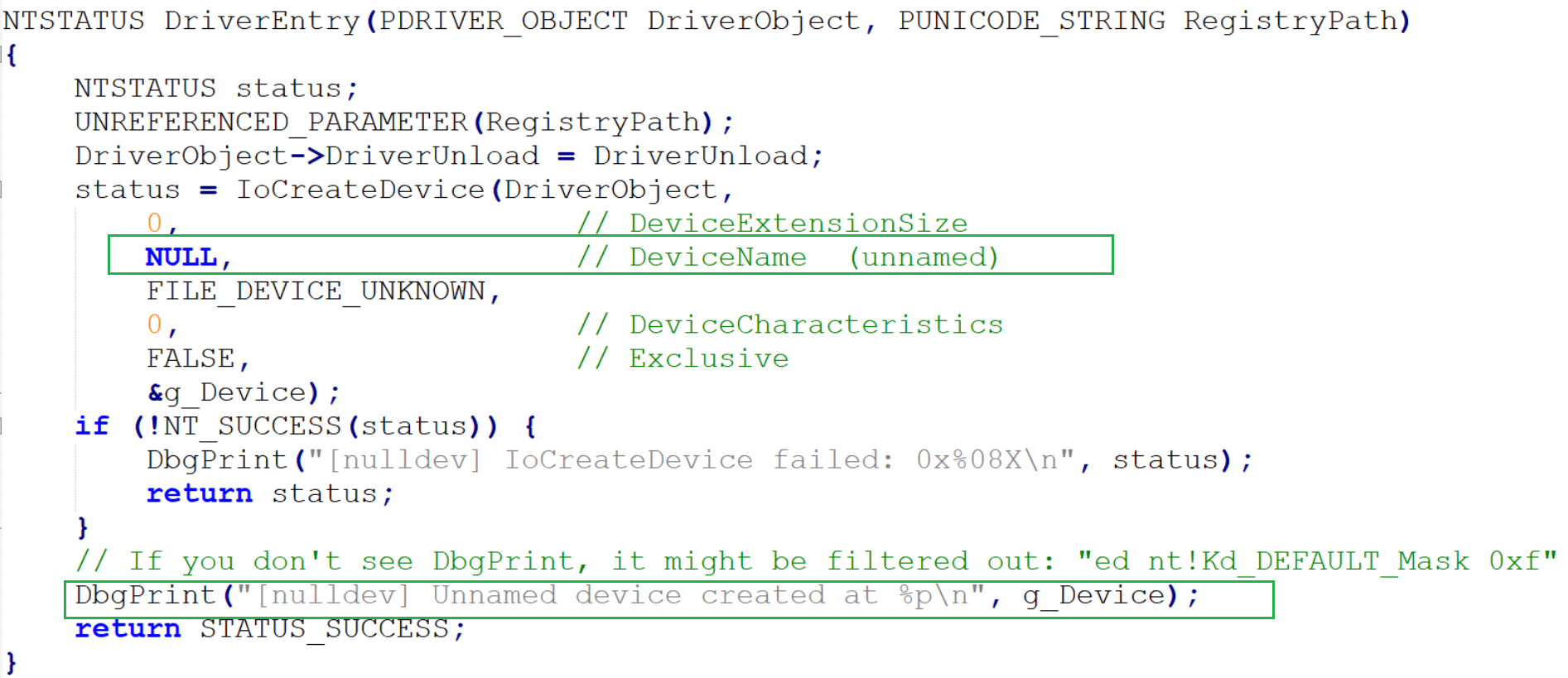
nulldev.c
Upon successful creation, the driver also calls DbgPrint(), so the address of the newly created device object appears in the debugger output.
Create:
sc.exe create nulldev type= kernel binPath= C:\test\nulldev.sys
[SC] CreateService SUCCESS
Run:
sc start nulldev

SERVICE_NAME: nulldev
        TYPE               : 1  KERNEL_DRIVER
        STATE              : 4  RUNNING
                                (STOPPABLE, NOT_PAUSABLE, IGNORES_SHUTDOWN)
        WIN32_EXIT_CODE    : 0  (0x0)
        SERVICE_EXIT_CODE  : 0  (0x0)
        CHECKPOINT         : 0x0
        WAIT_HINT          : 0x0
        PID                : 0
        FLAGS              :
Then we look into WinDBG:
nt!DbgBreakPointWithStatus:
fffff806`46c06f80 cc              int     3
kd> g
[nulldev] Unnamed device created at FFFF830CE5AE2E10
DbgPrint() displayed the address of the newly created unnamed device object (FFFF830CE5AE2E10).
Let’s inspect it with !devobj:
!devobj FFFF830CE5AE2E10

kd> Device object (ffff830ce5ae2e10) is for:
  \Driver\nulldev DriverObject ffff830ce58e9ae0
Current Irp 00000000 RefCount 0 Type 00000022 Flags 00000000
SecurityDescriptor ffffc486fbcef620 DevExt 00000000 DevObjExt ffff830ce5ae2f60
ExtensionFlags (0x00000800)  DOE_DEFAULT_SD_PRESENT
Characteristics (0000000000)
Device queue is not busy.
Not only we can clearly see that it has a security descriptor (SecurityDescriptor ffffc486fbcef620), but also its ExtensionFlags property tells us explicitly that its value is default (DOE_DEFAULT_SD_PRESENT).
We can inspect the descriptor by running !sd:
kd> !sd ffffc486fbcef620
->Revision: 0x1
->Sbz1    : 0x0
->Control : 0x8814
            SE_DACL_PRESENT
            SE_SACL_PRESENT
            SE_SACL_AUTO_INHERITED
            SE_SELF_RELATIVE
->Owner   : S-1-5-32-544
->Group   : S-1-5-18
->Dacl    :
->Dacl    : ->AclRevision: 0x2
->Dacl    : ->Sbz1       : 0x0
->Dacl    : ->AclSize    : 0x5c
->Dacl    : ->AceCount   : 0x4
->Dacl    : ->Sbz2       : 0x0
->Dacl    : ->Ace[0]: ->AceType: ACCESS_ALLOWED_ACE_TYPE
->Dacl    : ->Ace[0]: ->AceFlags: 0x0
->Dacl    : ->Ace[0]: ->AceSize: 0x14
->Dacl    : ->Ace[0]: ->Mask : 0x001201bf
->Dacl    : ->Ace[0]: ->SID: S-1-1-0

->Dacl    : ->Ace[1]: ->AceType: ACCESS_ALLOWED_ACE_TYPE
->Dacl    : ->Ace[1]: ->AceFlags: 0x0
->Dacl    : ->Ace[1]: ->AceSize: 0x14
->Dacl    : ->Ace[1]: ->Mask : 0x001f01ff
->Dacl    : ->Ace[1]: ->SID: S-1-5-18

->Dacl    : ->Ace[2]: ->AceType: ACCESS_ALLOWED_ACE_TYPE
->Dacl    : ->Ace[2]: ->AceFlags: 0x0
->Dacl    : ->Ace[2]: ->AceSize: 0x18
->Dacl    : ->Ace[2]: ->Mask : 0x001f01ff
->Dacl    : ->Ace[2]: ->SID: S-1-5-32-544

->Dacl    : ->Ace[3]: ->AceType: ACCESS_ALLOWED_ACE_TYPE
->Dacl    : ->Ace[3]: ->AceFlags: 0x0
->Dacl    : ->Ace[3]: ->AceSize: 0x14
->Dacl    : ->Ace[3]: ->Mask : 0x001200a9
->Dacl    : ->Ace[3]: ->SID: S-1-5-12

->Sacl    :
->Sacl    : ->AclRevision: 0x2
->Sacl    : ->Sbz1       : 0x0
->Sacl    : ->AclSize    : 0x1c
->Sacl    : ->AceCount   : 0x1
->Sacl    : ->Sbz2       : 0x0
->Sacl    : ->Ace[0]: ->AceType: SYSTEM_MANDATORY_LABEL_ACE_TYPE
->Sacl    : ->Ace[0]: ->AceFlags: 0x0
->Sacl    : ->Ace[0]: ->AceSize: 0x14
->Sacl    : ->Ace[0]: ->Mask : 0x00000001
->Sacl    : ->Ace[0]: ->SID: S-1-16-4096
We can also use WinDBG to iterate over all existing device objects and display their security descriptors using this script.
3.6.5 Security descriptors and device stacks
But even without such experiments, when we read the MSDN page about controlling device access for WDM drivers, we can see that the PnP manager determines the security descriptors for newly created device objects.
Additionally, the MSDN page describes when PnP applies a security descriptor to all device objects in the stack, and when it leaves the default security descriptor for each object unchanged:
For a WDM driver, the PnP manager determines the security descriptor for the device object as follows.
If the device has a security descriptor setting in the registry, it is applied to every object in the device stack.
Otherwise, if the device's setup class has a security descriptor setting in the registry, it is applied to every object in the device stack.
Otherwise, the PnP manager leaves the default security descriptor for each object unchanged. In this case, the default security descriptor for the stack is determined by the device type and device characteristics of the PDO.
Keep in mind that our previous example is not a PnP-compatible driver and thus we did not even call IoAttachDeviceToDeviceStack(), so there should not be any PnP involvement in the process.
Addditionally, the MSDN page titled Windows security model for driver developers MSDN, in section ACLs for device objects, says:
All device objects in a stack should have the same ACLs. Changing the ACLs on one device object in the stack changes the ACLs on the entire device stack. However, adding a new device object to the stack does not change any ACLs, either those of the new device object (if it has ACLs) or those of any existing device objects in the stack. When a driver creates a new device object and attaches it to the top of the stack, the driver should copy the ACLs for the stack to the new device object by copying the DeviceObject.Characteristics field from the next lower driver.
Which means that in most cases all device objects in a device stack will have the same security descriptor, but deviations from this rule are also technically possible.
Either way, even if an unnamed device object has a weak security descriptor, still it cannot be directly accessed from userland, so eventually the security descriptor that practically matters is the one of the named device in the stack.
3.6.6 Multiple named devices in a single device stack
Microsoft has always discouraged developers from naming their FDOs and filter DOs:
FDOs and filter DOs are not named. Function and filter drivers do not request a name when creating the device object. … Driver writers must not name more than one object in a device stack. The operating system checks security settings based on the named object. If two different objects are named and have different security descriptors, the I/O requests that are sent to the object with the weaker security descriptor can reach the device object with the stronger security descriptor.
But based on the disk.sys device stack example we have examined earlier, we also know it is technically possible to have more than one named device in a stack (although in the example DR0 (disk) and 0000002b (storvsc) are arguably not FDOs or filter DOs).
Having multiple named devices with different security descriptors attached to a device stack creates the possibility of simultaneous existence of alternative access paths requiring different sets of permissions. Such a situation would effectively defeat the stronger security descriptor and expose the entire device stack.
The recommendation not to name FDOs and filter DOs has also been reasonably argued against.
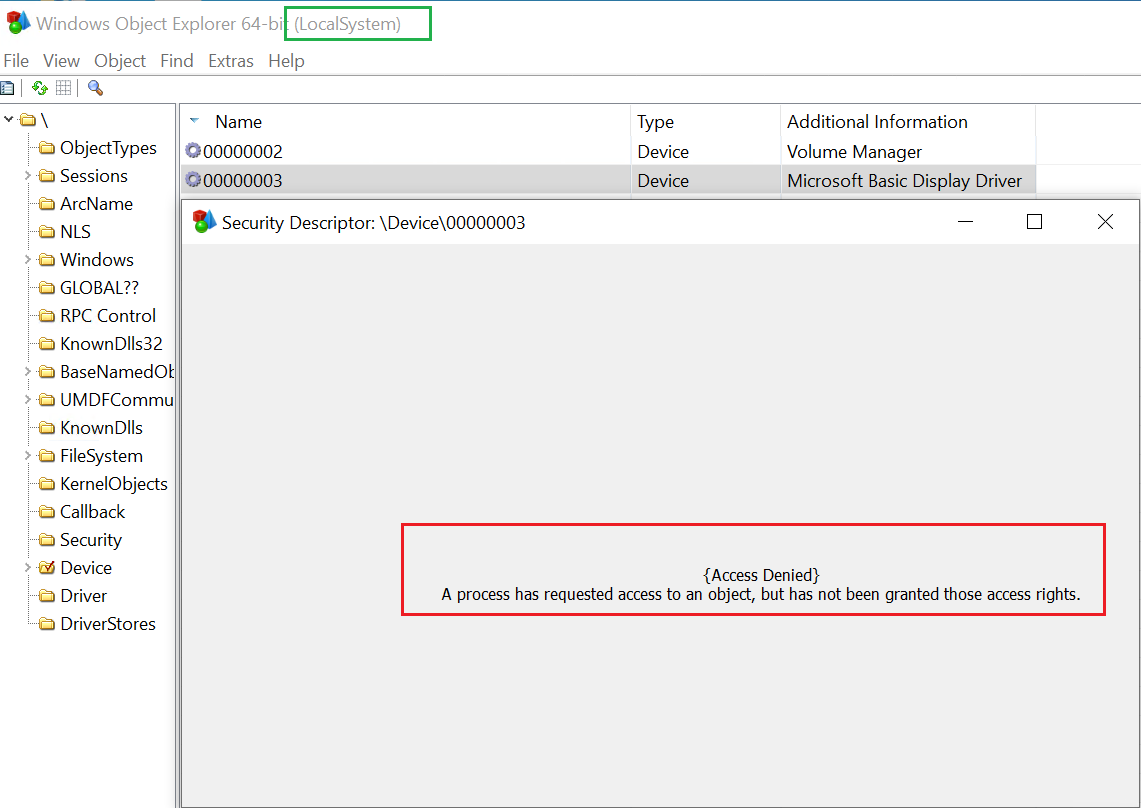
Access denied
Let’s use WinDBG to investigate what exactly is going on here:
kd> !object \device\00000003
Object: ffff9f0ba8fe8df0  Type: (ffff9f0ba8ef46c0) Device
    ObjectHeader: ffff9f0ba8fe8dc0 (new version)
    HandleCount: 0  PointerCount: 3
    Directory Object: ffffe004fc839150  Name: 00000003

kd> !devobj ffff9f0ba8fe8df0
Device object (ffff9f0ba8fe8df0) is for:
 00000003 \Driver\PnpManager DriverObject ffff9f0ba8fe1e30
Current Irp 00000000 RefCount 0 Type 00000004 Flags 00001040
SecurityDescriptor ffffe004fd6cc620 DevExt ffff9f0ba8fe8f40 DevObjExt ffff9f0ba8fe8f48 DevNode ffff9f0ba8ed5ca0
ExtensionFlags (0000000000)
Characteristics (0x00000180)  FILE_AUTOGENERATED_DEVICE_NAME, FILE_DEVICE_SECURE_OPEN
AttachedDevice (Upper) ffff9f0bab7e2030 \Driver\BasicDisplay
Device queue is not busy.
So the device object belongs to the PnPmanager driver. If we look into its security descriptor, we will discover it is actually quite permissive, with full control (access mask 0x001f01ff) for SYSTEM (SID: S-1-5-18) and Administrators (SID: S-1-5-32-544):
kd> !sd ffffe004fd6cc620
->Revision: 0x1
->Sbz1    : 0x0
->Control : 0x9814
            SE_DACL_PRESENT
            SE_SACL_PRESENT
            SE_SACL_AUTO_INHERITED
            SE_DACL_PROTECTED
            SE_SELF_RELATIVE
->Owner   : S-1-5-32-544
->Group   : S-1-5-18
->Dacl    :
->Dacl    : ->AclRevision: 0x2
->Dacl    : ->Sbz1       : 0x0
->Dacl    : ->AclSize    : 0x5c
->Dacl    : ->AceCount   : 0x4
->Dacl    : ->Sbz2       : 0x0
->Dacl    : ->Ace[0]: ->AceType: ACCESS_ALLOWED_ACE_TYPE
->Dacl    : ->Ace[0]: ->AceFlags: 0x0
->Dacl    : ->Ace[0]: ->AceSize: 0x14
->Dacl    : ->Ace[0]: ->Mask : 0x001f01ff
->Dacl    : ->Ace[0]: ->SID: S-1-5-18

->Dacl    : ->Ace[1]: ->AceType: ACCESS_ALLOWED_ACE_TYPE
->Dacl    : ->Ace[1]: ->AceFlags: 0x0
->Dacl    : ->Ace[1]: ->AceSize: 0x18
->Dacl    : ->Ace[1]: ->Mask : 0x001f01ff
->Dacl    : ->Ace[1]: ->SID: S-1-5-32-544

->Dacl    : ->Ace[2]: ->AceType: ACCESS_ALLOWED_ACE_TYPE
->Dacl    : ->Ace[2]: ->AceFlags: 0x0
->Dacl    : ->Ace[2]: ->AceSize: 0x14
->Dacl    : ->Ace[2]: ->Mask : 0x001201bf
->Dacl    : ->Ace[2]: ->SID: S-1-1-0

->Dacl    : ->Ace[3]: ->AceType: ACCESS_ALLOWED_ACE_TYPE
->Dacl    : ->Ace[3]: ->AceFlags: 0x0
->Dacl    : ->Ace[3]: ->AceSize: 0x14
->Dacl    : ->Ace[3]: ->Mask : 0x001200a9
->Dacl    : ->Ace[3]: ->SID: S-1-5-12

->Sacl    :
->Sacl    : ->AclRevision: 0x2
->Sacl    : ->Sbz1       : 0x0
->Sacl    : ->AclSize    : 0x1c
->Sacl    : ->AceCount   : 0x1
->Sacl    : ->Sbz2       : 0x0
->Sacl    : ->Ace[0]: ->AceType: SYSTEM_MANDATORY_LABEL_ACE_TYPE
->Sacl    : ->Ace[0]: ->AceFlags: 0x0
->Sacl    : ->Ace[0]: ->AceSize: 0x14
->Sacl    : ->Ace[0]: ->Mask : 0x00000001
->Sacl    : ->Ace[0]: ->SID: S-1-16-4096
The security descriptor is not the culprit here.
We can also see that the device object is a part of a device stack:
AttachedDevice (Upper) ffff9f0bab7e2030 \Driver\BasicDisplay
So, above \device\00000003 in the device stack there is another device object (ffff9f0bab7e2030) owned by the BasicDisplay driver. If we look into it (!drvobj \Driver\BasicDisplay 7), we will see the addresses of its dispatch routines, including IRP_MJ_CREATE:
Dispatch routines:
[00] IRP_MJ_CREATE                      fffff80236464ca0        dxgkrnl!DpiDispatchCreate
And we will see the device stack:
Device Object stacks:
...
!devstack ffff9f0bab7e2030 :
  !DevObj           !DrvObj                    !DevExt           ObjectName
> ffff9f0bab7e2030  \Driver\BasicDisplay    ffff9f0bab7e2180
  ffff9f0ba8fe8df0  \Driver\PnpManager         ffff9f0ba8fe8f40  00000003
So, clearly the unnamed device object at ffff9f0bab7e2030, owned by the BasicDisplay driver, is acting as an upper filter for the named device 00000003.
The reason we are failing to open a handle on \Device\00000003 despite having maximum privileges and full control granted in the security descriptor is the logic implemented in the IRP_MJ_CREATE routine of the BasicDisplay driver.
If we trace the execution flow, we will discover it reaches a conditional jump:
Device Object stacks:
...
!devstack ffff9f0bab7e2030 :
  !DevObj           !DrvObj                    !DevExt           ObjectName
> ffff9f0bab7e2030  \Driver\BasicDisplay    ffff9f0bab7e2180
  ffff9f0ba8fe8df0  \Driver\PnpManager         ffff9f0ba8fe8f40  00000003
The rdi register holds a pointer to the IRP. Offset 0x40 is where the requestor mode is held. If its value is not 0 (KernelMode), the jump is taken.
We can view the value by inspecting the memory location at the time of comparison:
0: kd> db rdi+40 L1
ffffcb87`c611e2b0  01
As expected, the value is 1 (01), which for RequestorMode means UserMode.
If we trace the execution flow further, eventually we will reach:
Breakpoint 1 hit
dxgkrnl!DpiDispatchCreate+0xe7:
fffff802`36464d87 e874e03dfa call nt!IofCompleteRequest (fffff802`30842e00)
The driver is invoking IofCompleteRequest, returning the IRP the the I/O manager. So the IRP never even reaches the IRP_MJ_CREATE dispatch routine of the driver positioned lower in the stack and attached to it via \Device\00000003, which is why we cannot open a handle to it.
So, the BasicDisplay driver, functioning as a filter, acts as an additional security layer to ensure that only kernel-mode callers can open a handle to any named device down the stack.
Rejecting IRPs in filter drivers is a very common design pattern for implementing access control.
3.7 Multiple device objects equal multiple entry points
When looking at Windows kernel mode drivers from the security perspective, it is also important to remember that a single driver (as an individual single kernel mode module) can have multiple device objects of different types and in varying configurations. For example, a single driver may have one filter device object attached to an existing device stack, while at the same time also having a CDO with a different (e.g. more permissive) security descriptor, effectively creating two alternative access paths to the same driver, reaching the same set of driver dispatch routines:
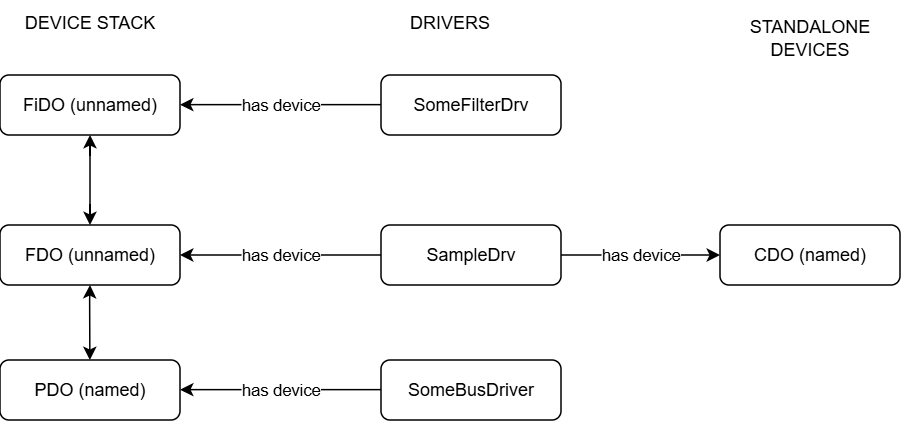 SampleDrv has multiple entry points
In the picture above the driver named SampleDrv has two device objects. One (FDO, unnamed) is attached to a device stack, and the other one is a standalone named CDO. This creates two possible entry points to this driver’s dispatch routines; one by opening a handle to the named PDO in the device stack the FDO is attached to, and another one by opening a handle to the CDO.
Such a scenario is even described on the following MSDN page – Using Control Device Objects – in section Uses of Control Device Objects, point 1.
Also, keep in mind that opening a handle to SampleDrv’s CDO would allow for direct interaction with that driver and its dispatch routines, but would not allow to send IRPs to the device stack the FDO is attached to.
Having multiple device objects is a potential security concern, particularly for WDM-compatible drivers. WDM is the first of the two driver frameworks created by Microsoft.
To better explain this, let’s look into the following WDM driver example. Full source code available here.
The driver creates two named device objects (typical CDOs, no PnP involved), with different security descriptors (one restrictive and one permissive):
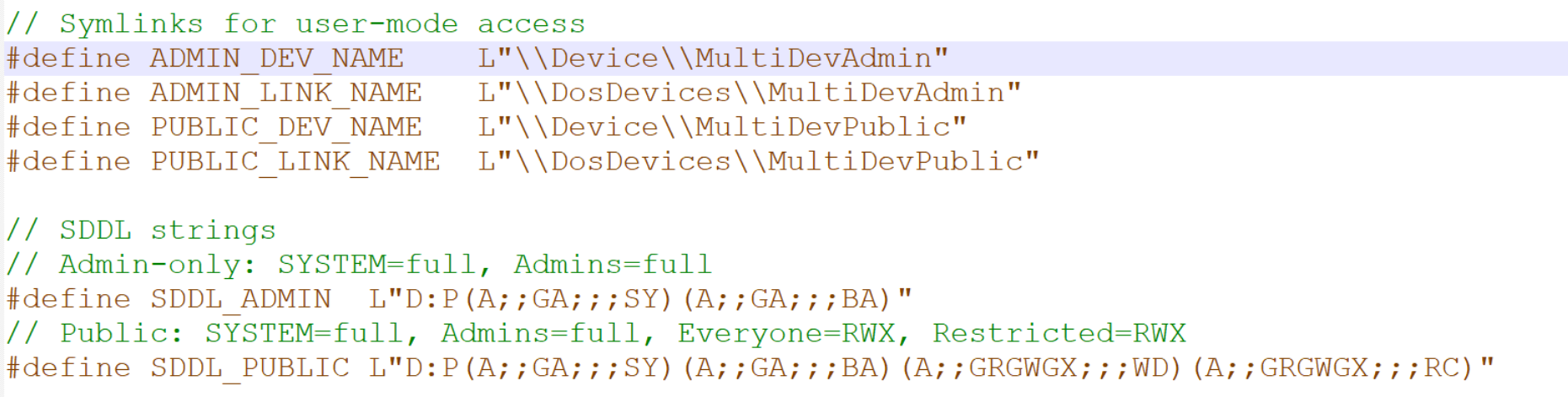
multidev_WDM device names and SDDLs
Both devices are created upon driver load, directly from DriverEntry.
Now, the key part – while having multiple device objects, the driver has one dispatch routine for IRP_MJ_DEVICE_CONTROL (it also does implement IRP_MJ_CREATE and IRP_MJ_CLOSE):
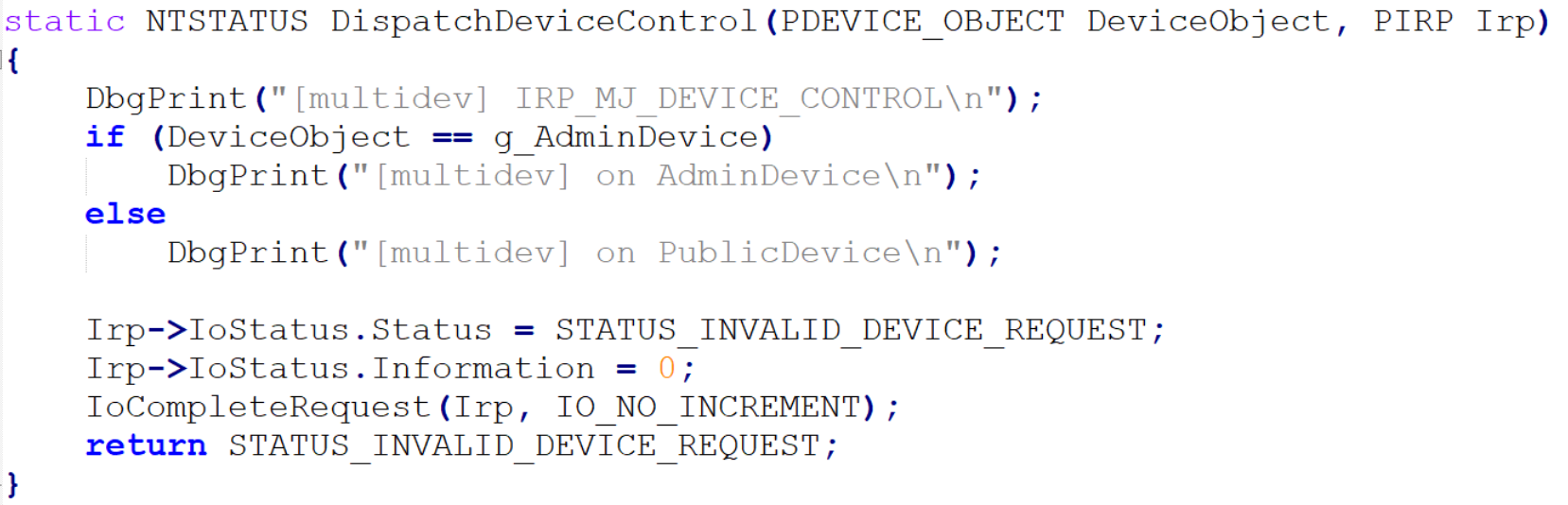
multidev_WDM IRP_MJ_DEVICE_CONTROL dispatch routine
This example is made only to demonstrate that the same kernel mode functions (dispatch routines) can be invoked via two different entry points with different privileges required.
After loading the driver we should see DbgPrint() output from DriverEntry:
[multidev] DriverEntry
[multidev] Both devices created successfully
Now let’s confirm that the device objects exist and their security descriptors are what we expect them to be:
PS C:\test> Import-Module NtObjectManager
PS C:\test> (Get-NtSecurityDescriptor '\Device\MultiDevPublic').ToSddl()
O:BAG:SYD:P(A;;FA;;;SY)(A;;FA;;;BA)(A;;0x1201bf;;;WD)(A;;0x1201bf;;;RC)S:AI(ML;;NW;;;LW)
PS C:\test> (Get-NtSecurityDescriptor '\Device\MultiDevAdmin').ToSddl()
O:BAG
This simple step should already trigger the following execution flow (WinDBG output). Each dispatch routine executed twice:
[multidev] IRP_MJ_CREATE
[multidev] on PublicDevice
[multidev] IRP_MJ_CLOSE
[multidev] on PublicDevice
[multidev] IRP_MJ_CREATE
[multidev] on AdminDevice
[multidev] IRP_MJ_CLOSE
[multidev] on AdminDevice
This is because NtObjectManager already opened handles to both devices to read their security descriptors, invoking IRP_MJ_CREATE. IRP_MJ_CLOSE follows shortly, on handle closure.
Now, let’s try invoking the IRP_MJ_DEVICE_CONTROL dispatch routine from a non-admin user (full source code here), first by attempting to use \Device\MultiDevAdmin, then \Device\MultiDevPublic.
C:\Users\normal\Desktop>multidev_WDM.exe
Trying to open the admin device: \\.\MultiDevAdmin
Failed to open device \\.\MultiDevAdmin: 5
Trying to open the admin device: \\.\MultiDevPublic
Device opened successfully
Sending IOCTL 0x8DF0004
IOCTL succeeded, bytes returned: 0
As expected, attempting to open MultiDevAdmin ends up with error 5 (access denied), while opening MultiDevPublic succeeds.
Meanwhile in WinDBG we can see that all three dispatch routines executed, each once:
[multidev] IRP_MJ_CREATE
[multidev] on PublicDevice
[multidev] IRP_MJ_DEVICE_CONTROL
[multidev] on PublicDevice
[multidev] IRP_MJ_CLOSE
[multidev] on PublicDevice
Which clearly demonstrates how the same kernel mode code can be reachable from userland via multiple device objects, and those device objects may have different security descriptors, with the weaker allowing users to bypass the stricter.
Multidevice WDM drivers often have conditional code blocks activated based on which device object was used to deliver the currently processed IRP, similar to the ones in this example:
static NTSTATUS DispatchCreate(PDEVICE_OBJECT DeviceObject, PIRP Irp)
{
    DbgPrint("[multidev] IRP_MJ_CREATE\n");
    if (DeviceObject == g_AdminDevice)
        DbgPrint("[multidev] on AdminDevice\n");
    else
        DbgPrint("[multidev] on PublicDevice\n");
}
Also note that we sent a random IOCTL code which was not even processed in the IRP_MJ_DEVICE_CONTROL dispatch routine.
3.7.2 Multidevice WDF (KMDF) drivers
In WDF (KMDF)-compatible drivers the situation is more complex, as I/O queues are registered and managed separately per device object. The entire dispatch routine table is hooked by WDF and code execution moves to internal driver functions only if WDF decides so according to the queues registered by the driver. Exploring those caveats is beyond the scope of this article.
3.8 FILE_DEVICE_SECURE_OPEN
Last but not least, this article would not be complete without mentioning the FILE_DEVICE_SECURE_OPEN flag. FILE_DEVICE_SECURE_OPEN determines how access control is enforced for driver namespace requests. As https://learn.microsoft.com/en-us/windows-hardware/drivers/kernel/controlling-device-namespace-access reads:
Most drivers do not implement support for open operations into the device's namespace, but all drivers must provide security checks to prevent unauthorized access to the device's namespace. By default, security checks for file open requests within the device's namespace, (for example, "\Device\DeviceName\FileName") are left entirely up to the driver—the device object ACL is not checked by the operating system.

If a device object's FILE_DEVICE_SECURE_OPEN characteristic is set, the system applies the device object's security descriptor to all file open requests in the device's namespace.
If a device object’s FILE_DEVICE_SECURE_OPEN characteristic is set, the system applies the device object’s security descriptor to all file open requests in the device’s namespace.
Let’s see for ourselves in practice, using our previous multidevice WDM driver example and its userland proof of concept.
The driver in its original version (the one you can find in the repository) uses FILE_DEVICE_SECURE_OPEN flag when creating its named devices via IoCreateDeviceSecure.
First, the userland part. Let’s take our multidev_WDM.c example used earlier and change DEVICE_NAME_ADMIN by appending ‘’ to it:
#define IOCTL_TEST 0x8df0004
#define DEVICE_NAME_ADMIN L"\\\\.\\MultiDevAdmin\\hacker"
#define DEVICE_NAME_PUBLIC L"\\\\.\\MultiDevPublic"
We recompile and run it again from a regular user account (till this point the driver stays intact):
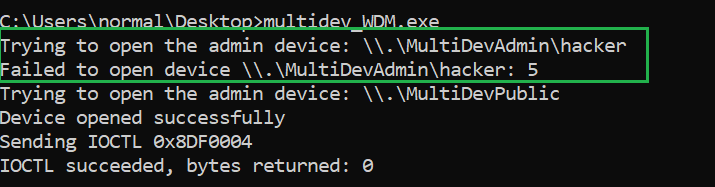
No FILE_DEVICE_SECURE_OPEN – test
As expected, the namespace trick did not change the outcome and did not bypass the strict security descriptor.
Now, let’s remove the FILE_DEVICE_SECURE_OPEN flag from the parameters passed to IoCreateDeviceSecure:
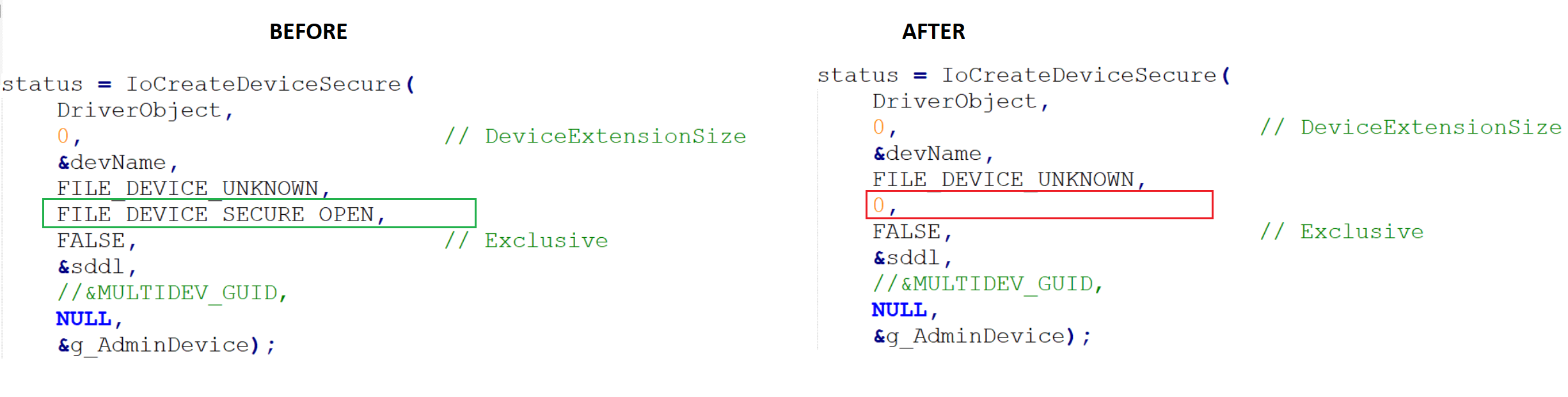
Multidev WDM before and after modification
Then we recompile and redeploy the driver (the older instance needs to be unloaded with sc.exe stop multidev_WDM prior to replacing the .sys file, then the service needs to be started back up).
We run it again from a regular user account, this time successfully opening a handle to the admin device despite having 0 access rights granted in its security descriptor:
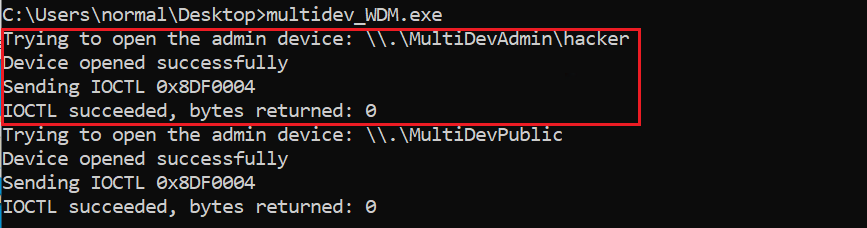
No FILE_DEVICE_SECURE_OPEN – test
So, FILE_DEVICE_SECURE_OPEN controls whether the I/O Manager applies the device’s security descriptor to IRP_MJ_CREATE requests within the device’s namespace.
Just for the record, FILE_DEVICE_SECURE_OPEN only applies to named device objects. For unnamed devices the flag is meaningless because:
- One cannot open an unnamed device by name — there is no name to construct a path from.
- The flag is evaluated during name resolution, which by definition involves the named device object.
- No name = no namespace = nothing for the flag to protect.
The flag only matters for the named device in the stack — the one that serves as the entry point for NtCreateFile. Unnamed filter/FDO devices above or below it in the stack just receive the IRP after the access check has already happened against the named object.
4. Bonus – device mapper tool
During my exploration of device objects, I wrote a Powershell script, using NtObjectManager. It collects the full list of objects in the \Device\ directory and for each one of them it attempts to collect the following information: – symlink in GLOBAL?? (if present), – SDDL, – admin_only (Y|N, based on SDDL), – the driver that created the device object, – additional information for PnP drivers.
Having a separate column for admin only access along with symlink information is very helpful, as it allows to easily filter the view, e.g. to only see the device objects with permissive security descriptors and no symlinks in \GLOBAL??.
The results are saved in a CSV file, so it is convenient for both manual review as well as for automation (for example to detect and inspect changes).
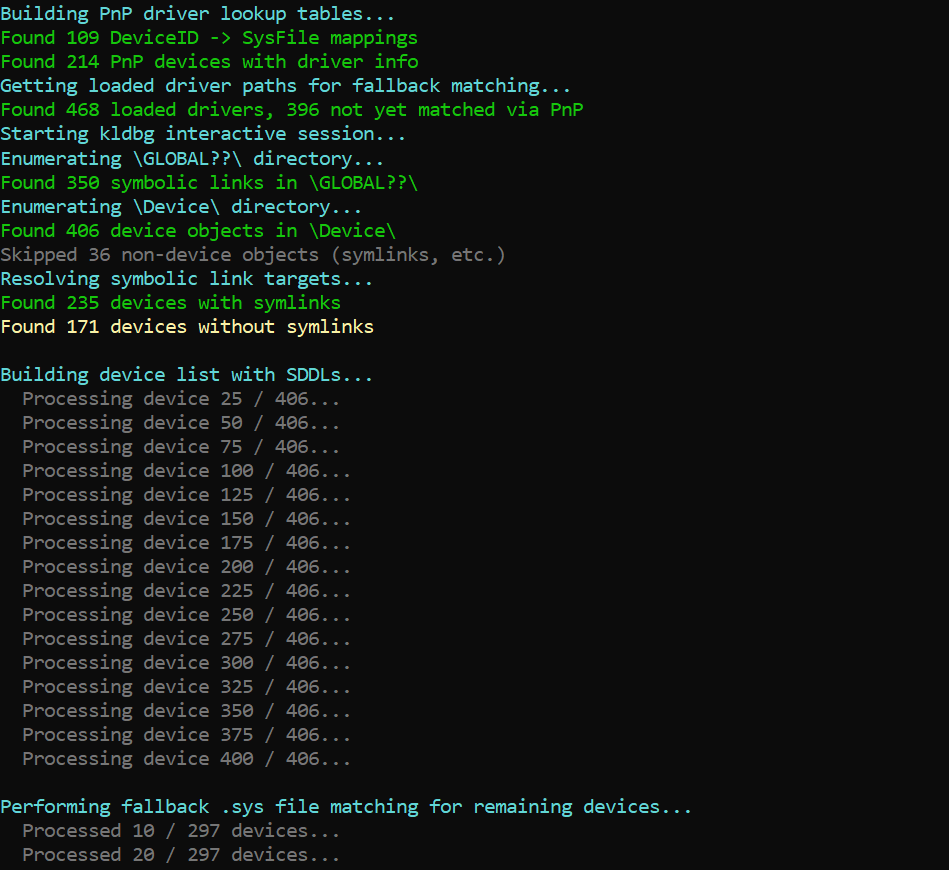
Running the tool
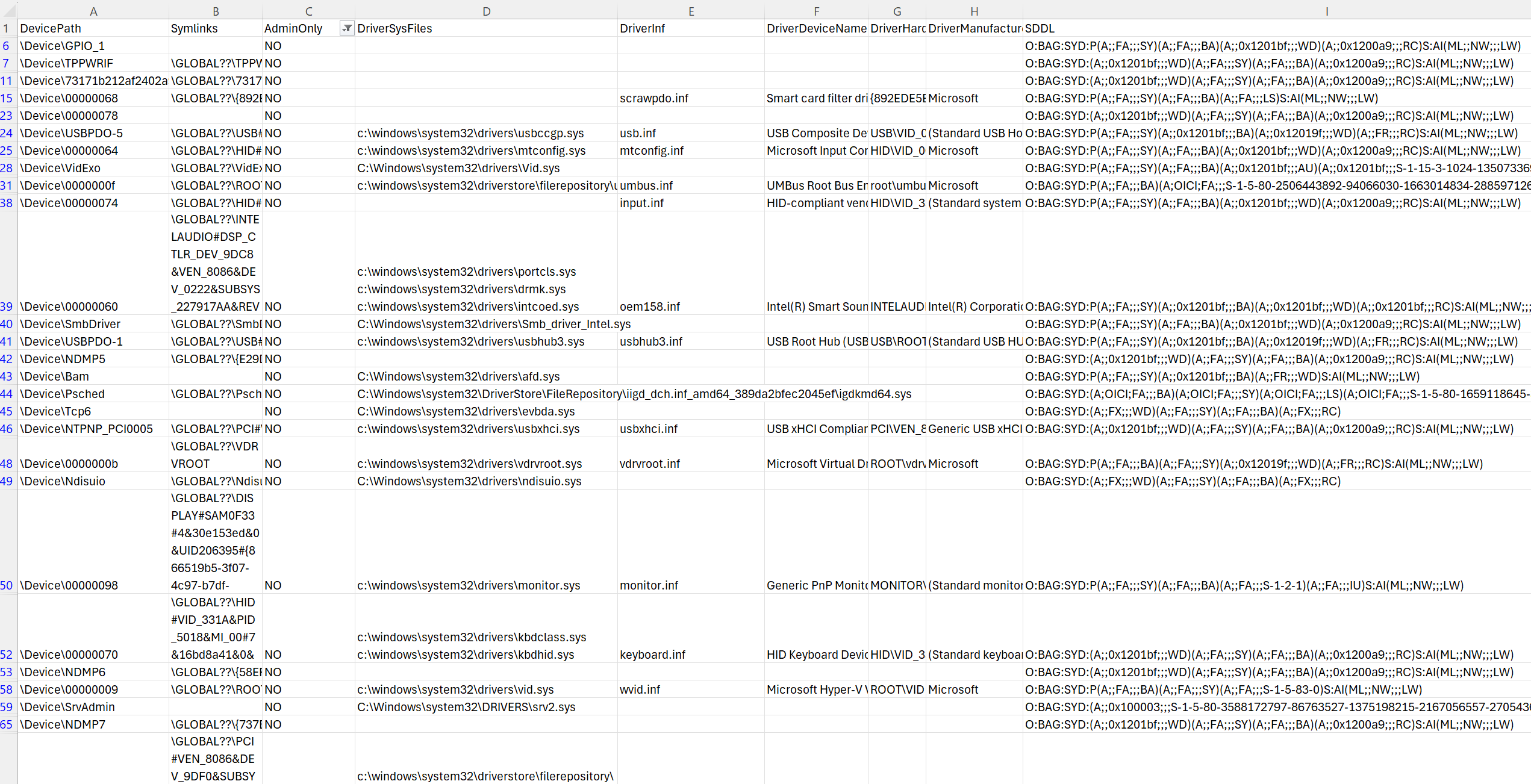
Viewing results
I’m sharing this resource to lay the groundwork for my next article (which I’m currently working on), and I simply hope it’ll be useful to anyone interested in the topic.
Posted on: March 30th, 2026

Julian Horoszkiewicz
Follow or contact Julian:

Share this article